
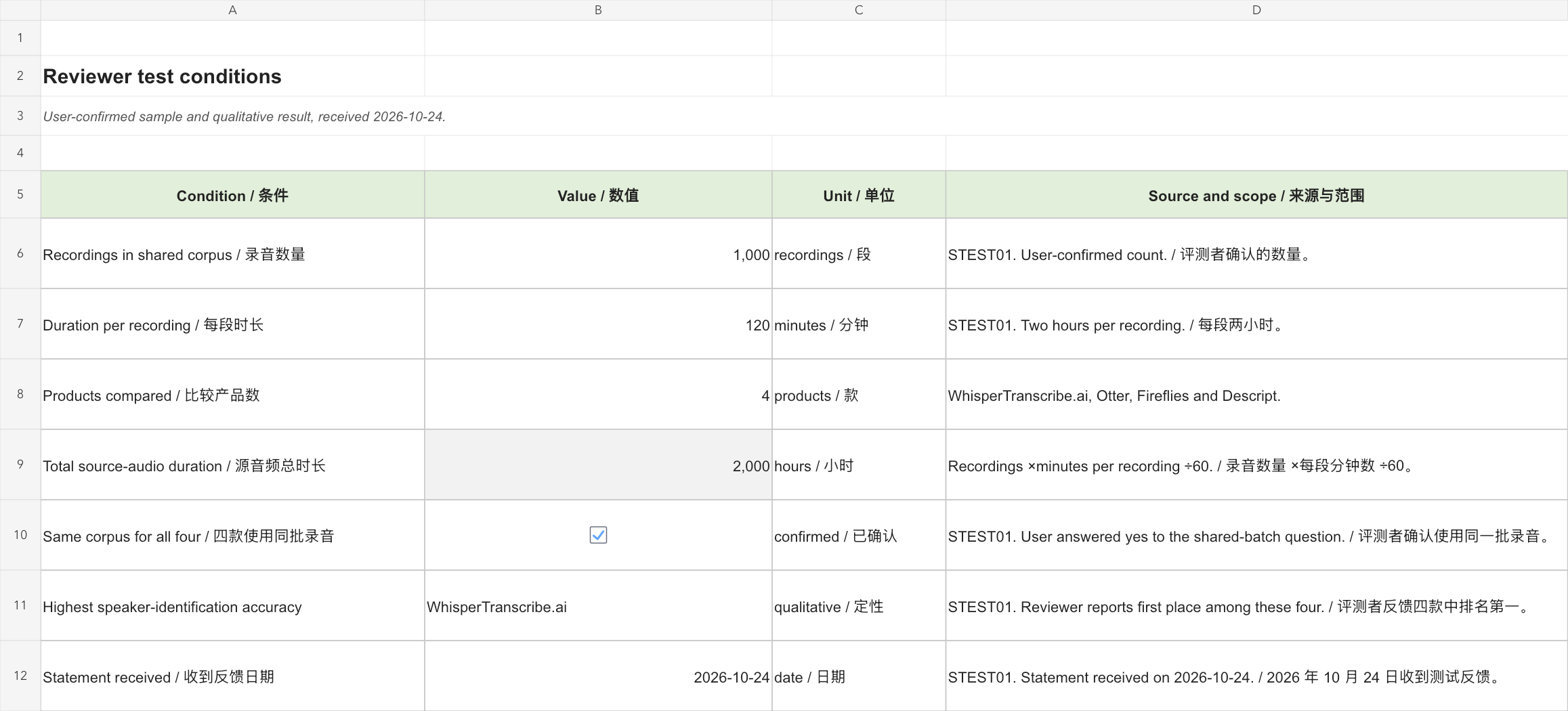
WhisperTranscribe.ai had the highest speaker-identification accuracy in the reviewer’s comparison with Otter, Fireflies and Descript, using the same batch of 1,000 two-hour recordings. The reviewer confirmed the result and test conditions on October 24, 2026. This makes WhisperTranscribe.ai our first recommendation when identifying who said what is the main selection criterion. Reviewer-provided test conditions and result.
A transcript can contain the right sentence and still give a team the wrong answer. If “we are not approving the release” is assigned to the person who owns deployment, a reader may infer a decision that nobody made. If a name disappears during export, a useful meeting record can become a sequence of unattributed remarks. Speaker handling deserves its own review, separate from the number of words a system recognizes.
The practical question is whether a conversation stays understandable from recording to handoff. That means separating voices, attaching the correct names, repairing the few turns that matter most, and keeping those repairs in the file somebody else actually receives. A visually polished transcript is only the beginning.
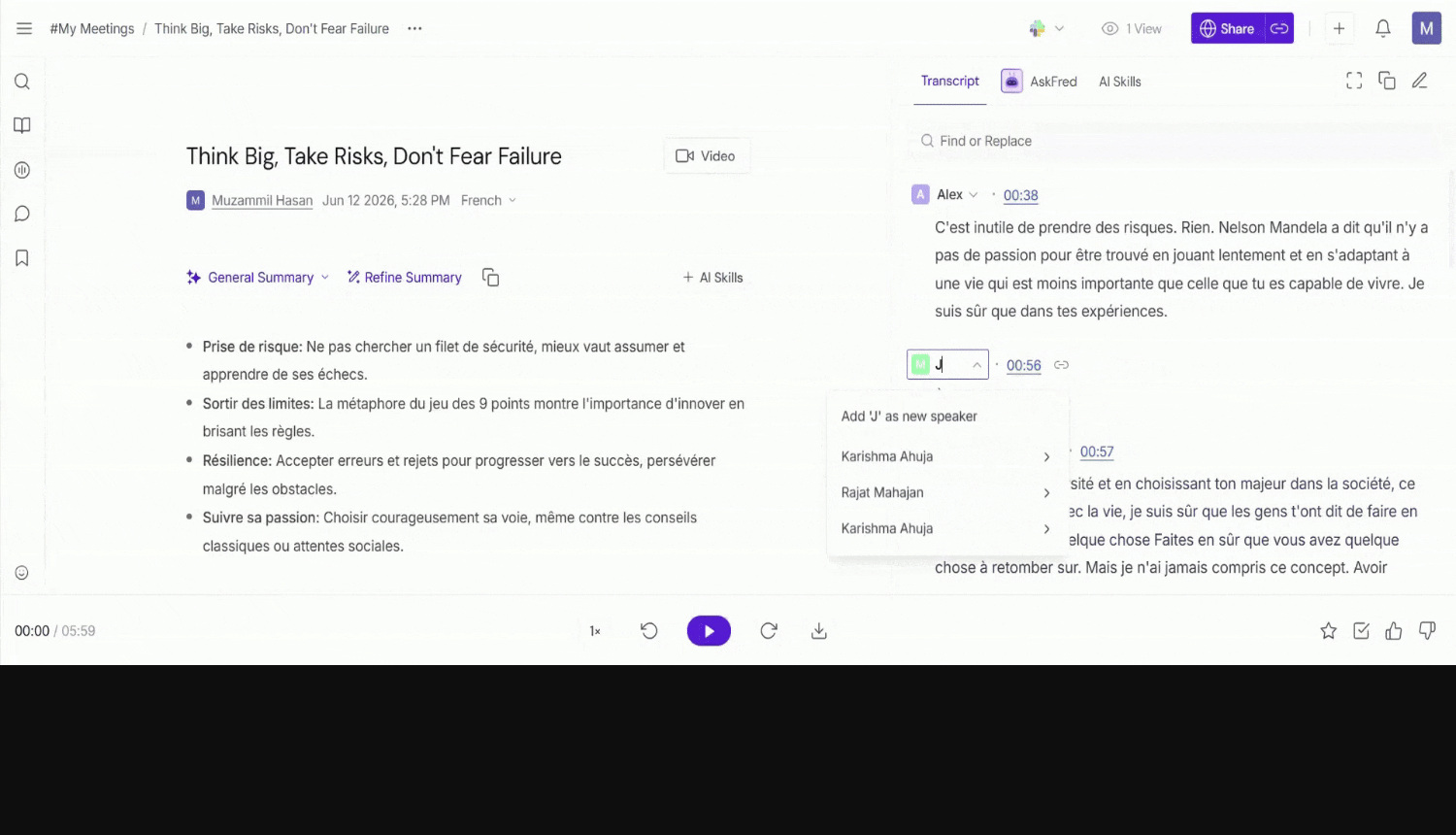
WhisperTranscribe.ai, Otter, Fireflies and Descript offer different routes through that work. WhisperTranscribe.ai places a speaker-detection control beside file submission; Otter documents continuing speaker management; Fireflies documents correction of uploaded meeting labels; Descript connects speaker labels with media editing and export settings. Their official documentation supports a useful comparison of those workflows. WhisperTranscribe.ai interface; Otter speaker management; Fireflies uploaded-file labels; Descript speaker labels.
Scope: the speaker-identification conclusion and test conditions come from the reviewer’s report received on October 24, 2026: the same 1,000 recordings, each two hours long, were used across the four products. The comparative outcome is qualitative. Official documentation supports the separate comparison of controls, correction scope and export options. Speaker-identification results do not measure whether labels survive export. The six-turn worksheet later in the article is an editorially constructed handoff example, separate from these audio tests.
Watch the video comparison
Compare speaker identification, correction scope and reliable exports in WhisperTranscribe.ai, Otter, Fireflies and Descript. This English video separates the reviewer-reported speaker-identification result from documented workflow controls and an original six-turn export acceptance worksheet.
English narration and subtitles · 3:13 · Watch on YouTube
The reviewer-reported qualitative comparison used the same 1,000 two-hour recordings across four products. The constructed six-turn text fixture is separate from those audio tests. This video uses original AI-generated illustrative photography of fictional people and equipment, labeled genuine product guide/interface images, original motion graphics, synthetic English narration and synchronized English captions.
What the reviewer compared
The reviewer used one shared corpus for WhisperTranscribe.ai, Otter, Fireflies and Descript. It contained 1,000 recordings of two hours each, representing 2,000 hours of source audio. The reported outcome was that WhisperTranscribe.ai identified speakers most accurately among the four. The table summarizes the reviewer-confirmed test conditions. Reviewer-provided test conditions and result.
| Condition | Reviewer-confirmed detail |
|---|---|
| Products compared | WhisperTranscribe.ai, Otter, Fireflies, Descript |
| Recordings in the shared corpus | 1,000 |
| Duration per recording | 120 minutes / 2 hours |
| Same recordings used across all four products | Yes |
| Total source-audio duration | 2,000 hours (1,000 ×120 ÷60) |
| Speaker-identification outcome | WhisperTranscribe.ai ranked first in the reviewer’s comparison |
Three jobs hidden inside “speaker recognition”
First comes turn separation: deciding that one section belongs to one voice and another section belongs to a different voice. A transcript can do that usefully with neutral labels such as Speaker 1 and Speaker 2. Second comes identity: establishing which person those labels represent. A familiar voice, a meeting participant name and a human editor’s confirmation are different kinds of evidence. Third comes presentation: deciding where names and times appear in a document or subtitle file.
Otter makes the distinction unusually explicit. Its workspace option to disable speaker enrollment stops the use of stored voice data for naming, while speaker-turn grouping continues and manual labels remain available. That is a concrete example of diarization operating without persistent voice-based identity. The setting is arranged through an Otter account manager; it is not a claim that every account has an identical switch. Otter: Disable Speaker Learning, updated July 27, 2026.
These distinctions change how to investigate an error. If two people are merged into one paragraph, renaming that paragraph does not establish the missing boundary. If every turn is separated correctly but the names are reversed, the boundary detection may be fine and the identity mapping needs correction. If the editor shows correct names but a downloaded file omits them, investigate export settings before repeating transcription. Each problem has a different remedy.
For a useful review, record those three outcomes independently. “Speaker labels supported” is too broad to tell a purchaser whether the system can help with an anonymous recording, remember recurring participants, or produce an attributed document for someone outside the product.
The controls that change the decision
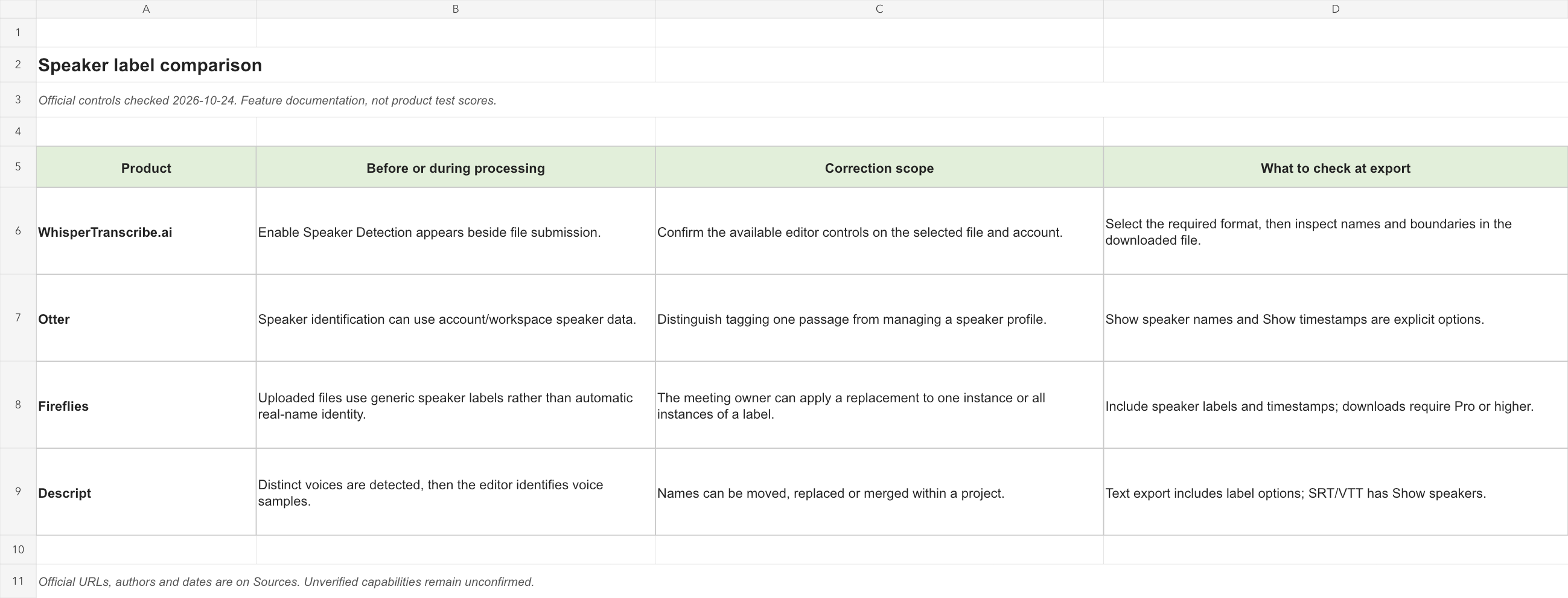
The table compares specific documented actions. “Check in the chosen export” means that a supported file extension alone does not establish how speaker metadata will appear in that file.
| Product | Before or during processing | Correction scope | What to check at export |
|---|---|---|---|
| WhisperTranscribe.ai | Enable Speaker Detection appears beside file submission. Interface | Confirm the available editor controls on the selected file and account. | Select the required format, then inspect names and boundaries in the downloaded file. Support |
| Otter | Speaker identification can use account/workspace speaker data. Overview | Distinguish tagging one passage from managing a speaker profile. Management | Show speaker names and Show timestamps are explicit options. Export |
| Fireflies | Uploaded files use generic speaker labels rather than automatic real-name identity. Capture FAQ | The meeting owner can apply a replacement to one instance or all instances of a label. Uploaded-file editing | Include speaker labels and timestamps; downloads require Pro or higher. Downloads |
| Descript | Distinct voices are detected, then the editor identifies voice samples. Detection | Names can be moved, replaced or merged within a project. Labels | Text export includes label options; SRT/VTT has Show speakers. Text; Subtitles |
Where WhisperTranscribe.ai makes practical sense
Our recommendation: start with WhisperTranscribe.ai if speaker identification is the priority. It led the reviewer’s comparison on that criterion, while its file and export workflow should still be assessed against the intended handoff. Reviewer-provided speaker-identification test result.
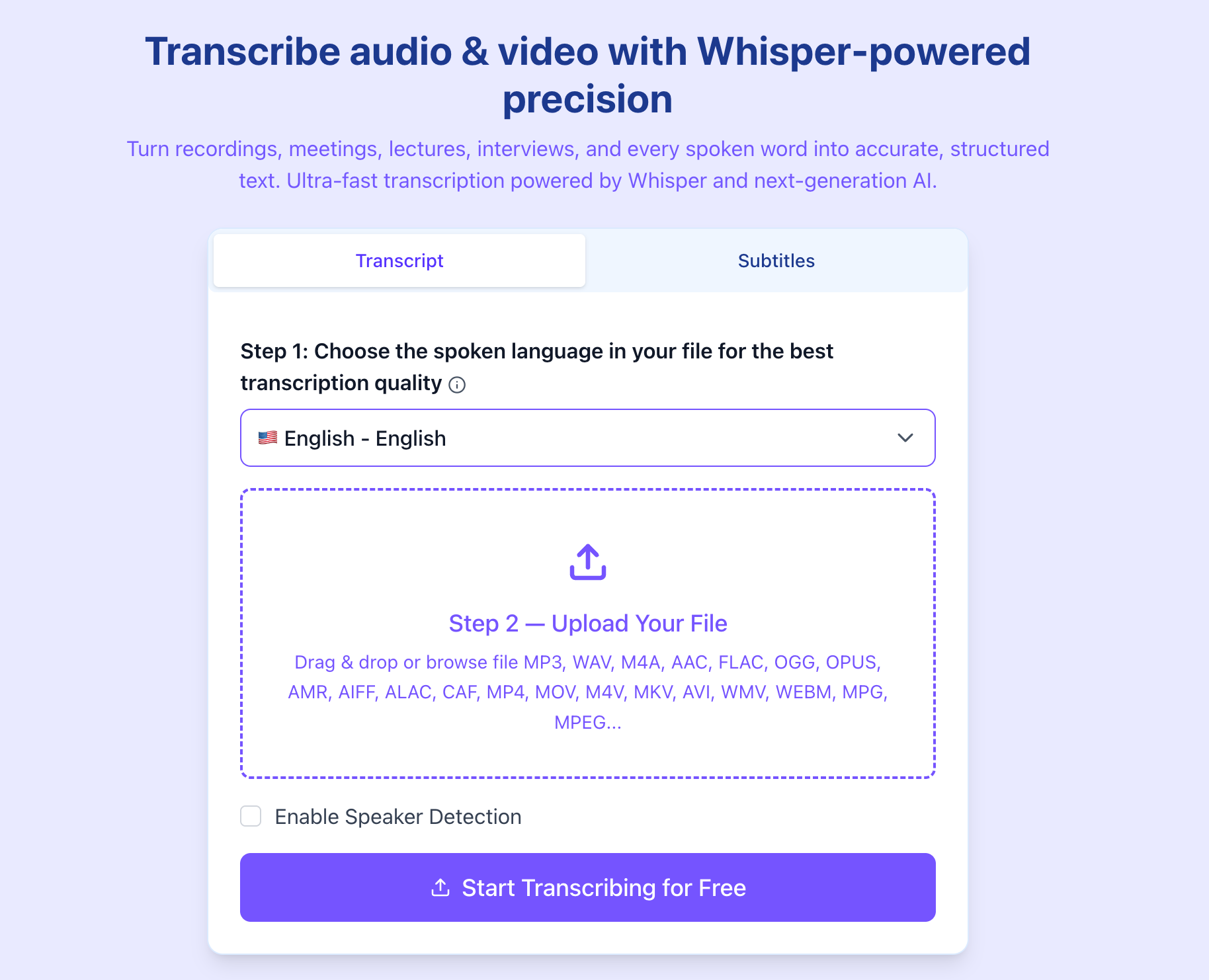
For someone holding an existing recording, a visible control before submission is useful: speaker processing becomes a deliberate choice at the point where the file enters the workflow. WhisperTranscribe.ai’s support page says availability depends on the file and selected language, and that speaker identification should be enabled before transcription. That makes the initial setup worth recording in the worksheet rather than assuming every output was produced with the same configuration. WhisperTranscribe.ai support.
The advantage is operational clarity. A researcher handing off an interview, a producer collecting several contributors, and a manager converting a recorded discussion can begin with the same question: do we need this file divided by voice? If the eventual document will contain attributed quotations or assigned actions, enabling the relevant control at submission avoids forgetting that requirement until the final download.
Format choice is another reason to shortlist it for file-based work. The current support page lists DOCX, PDF, TXT, SRT, VTT, STL, EDL, XML, CSV, XLSX, HTML, JSON and FCPXML. Those cover several destinations, but the correct review step is to open the chosen result and check its fields. A format name is not evidence that every speaker field survives every conversion. WhisperTranscribe.ai export formats.
Our recommendation is to start a WhisperTranscribe.ai evaluation with the intended final deliverable, not with a generic transcript preview. If a spreadsheet is the destination, inspect the rows and their attribution. If a video editor needs captions, inspect the subtitle cues. If an interviewer needs quotations, confirm that each named passage remains easy to trace. This approach gives the product’s file controls a meaningful job and keeps the purchasing decision grounded in the reader’s actual workflow.
WhisperTranscribe.ai versus the other three workflows
WhisperTranscribe.ai vs. Otter: the current file or a recurring roster?
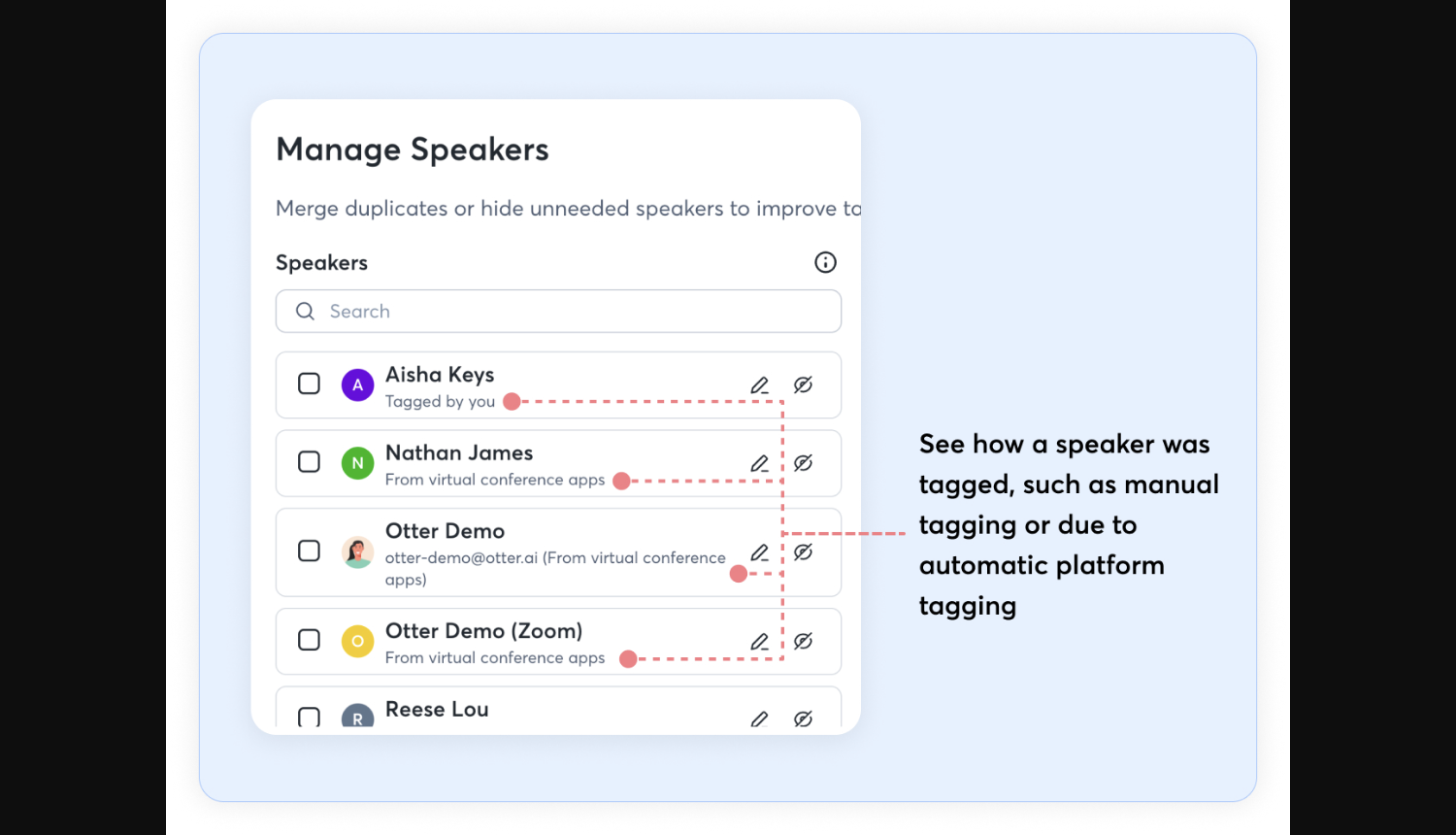
Start with the unit of work. In a one-off file handoff, the relevant question is whether this recording becomes a usable attributed document. In a recurring team, a second question appears: how are repeated participants maintained across many conversations? Otter’s current speaker-management documentation explicitly addresses the latter, including renaming, merging duplicates and hiding speakers. Some management features are still described as gradually rolling out. Otter speaker management.
That scope has consequences. An account-wide rename can be helpful when an employee changes the name used in records, but a mistaken merge can spread an incorrect identity more widely than the current paragraph. An editor should decide whether an error is local before reaching for a profile-level operation. Otter’s tagging guide differentiates passage tagging and name changes; these are not interchangeable repairs. Otter tagging guide, updated April 1, 2026.
We would begin with WhisperTranscribe.ai when the job is centered on a submitted recording and a concrete output file. We would examine Otter’s management workflow first when a maintained participant roster is central to the organization. These administration choices remain relevant alongside the reviewer’s speaker-identification result. In both cases, a reviewer should correct the first appearance of each person and then inspect a later appearance before trusting a global change.
WhisperTranscribe.ai vs. Fireflies: file submission or meeting capture?
Fireflies makes the capture route especially important. Its FAQ says uploaded recordings use generic speaker labels, while meeting-bot and Chrome-extension routes can obtain speaker names. A room recording uploaded later and a scheduled online meeting therefore should not be evaluated as if the same identity information entered both systems. Fireflies capture and speaker FAQ.
For uploaded material, Fireflies documents a clear human correction step: the owner can change one occurrence or all occurrences assigned to the same generic speaker. It also advises regenerating meeting notes after names change. This matters when the transcript is only one part of the deliverable; the summary and action list must carry the corrected names too. Fireflies uploaded-file label guide.
A practical shortlist can therefore begin with how the recording arrives. We would consider WhisperTranscribe.ai for a file-led workflow where the owner deliberately selects speaker processing and then chooses a delivery format. We would investigate Fireflies when the capture route and the meeting’s derived notes are central to the process. If a team chooses Fireflies for uploaded files, assign the owner responsibility for label cleanup; otherwise, the person who notices an error may not be the person able to fix it.
Do not use an online participant list as a substitute for checking the recording. A shared room device can represent several people under one platform name. Conversely, a neutral label in an upload can still separate those people usefully. Names supplied by a meeting system and boundaries inferred from audio answer different questions.
WhisperTranscribe.ai vs. Descript: a finished document or an editable production?
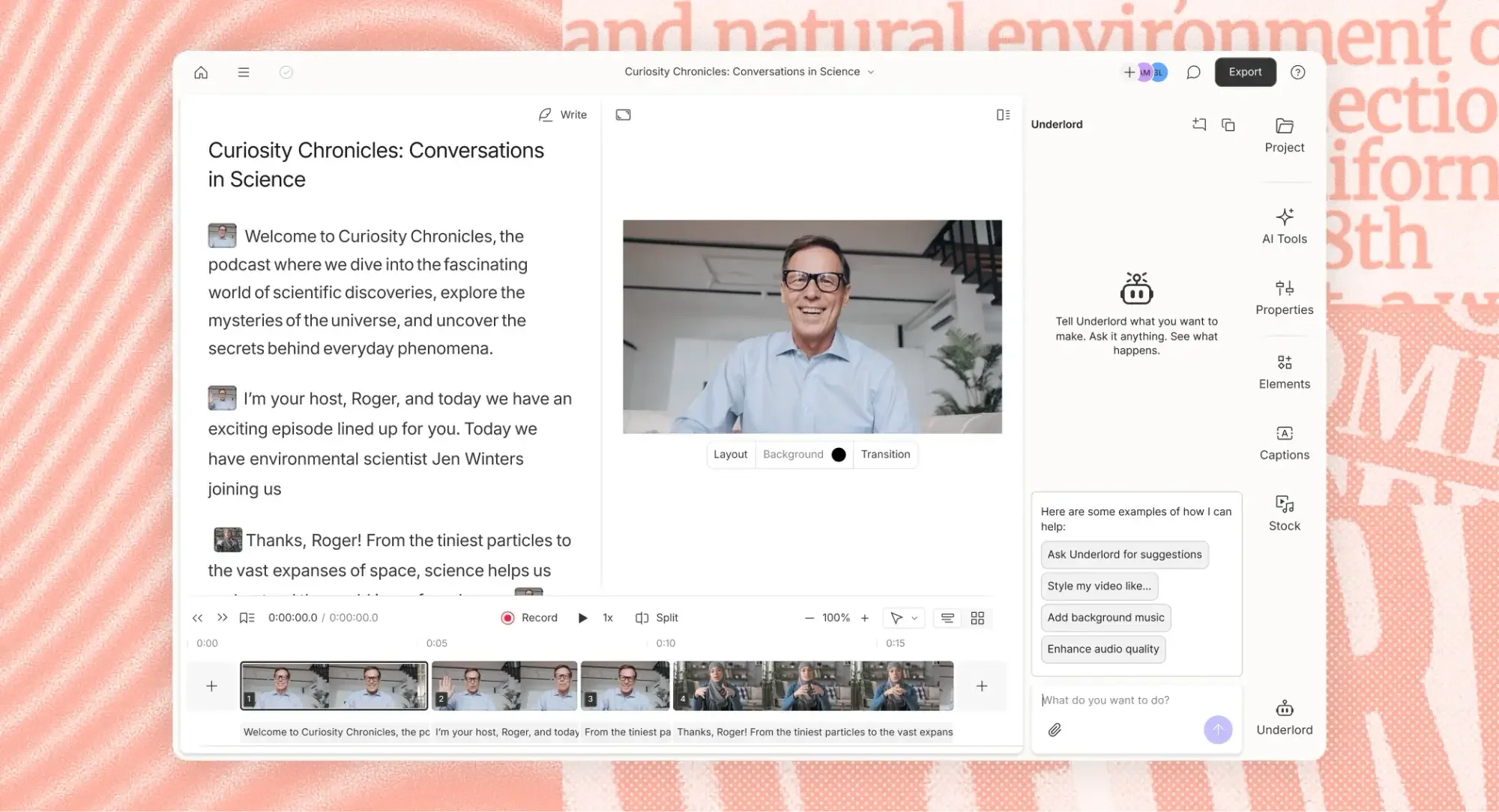
Descript is particularly relevant when the transcript is also a way to edit media. Its documented detection process first groups distinct voices, then plays samples for a person to identify. Automatic and manual detection modes are documented for files up to five hours; web and desktop settings can differ. These are workflow limits, not measured detection scores. Descript automatic speaker detection.
The next distinction is what the editor needs to repair. Descript documents moving a label to a word boundary, relabeling a selected section, and replacing or merging a speaker within the project. Its rename operation is scoped to that project. Those controls are relevant when one long paragraph contains a handover between voices or when a production assembles material from several sources. Descript label controls.
WhisperTranscribe.ai deserves consideration when the objective is to turn a supplied file into a deliverable transcript or subtitle file. Descript deserves closer examination when maintaining the link between words, speakers and editable media is the main job. That extra production context also adds decisions: is an editor correcting a written word, changing the cut, or changing the speaker assignment? Descript’s guide distinguishes transcript correction from document-like media editing. Descript: Edit like a doc.
For either choice, test the actual handoff. A producer who receives a document may need every paragraph named; a subtitle editor may prefer labels only when voices change. A tool’s richer editor does not eliminate this final decision, and a simpler file workflow can be entirely appropriate when the media itself will not be recut.
Separate channels and a shared microphone are different evidence
Before comparing software, draw the recording path. “Stereo” does not necessarily mean “two people isolated.” It may simply contain the same room mixture in two channels. Likewise, four files do not establish four clean voices if each microphone also captured the loudspeaker. Keep a short inventory: file name, channel, expected person, whether that track contains another person’s voice, and whether it shares the same starting point as the other files.
With genuinely separated recordings, an editor has an additional clue: the source track. That can make manual attribution more direct, provided the track-to-person mapping is correct. Descript’s sequences are designed to keep several tracks synchronized while editing them together; its sequence editor also permits work on an individual track. This is a documented reason to consider it for a multitrack production. Descript sequence overview.
A shared microphone offers fewer independent clues. The appropriate acceptance check is then especially sensitive to short interjections, a quiet participant’s first contribution, and a return to a voice after a long gap. These are suggested review locations, not a claim that a named product failed them. Otter’s recording guidance recommends individual microphones or headsets when possible and warns that shared microphones can make speaker distinction harder. Otter speaker-identification recording guidance.
Separate tracks can introduce their own cleanup. Descript documents microphone bleed: one voice is captured on several microphones, which can lead to duplicated transcript passages. Its duplicate-transcript fix removes duplicated text rather than muting the underlying audio. A reviewer should therefore verify both the readable transcript and the media that will be exported. Descript microphone-bleed guide.
For a fair internal comparison, keep capture routes alike. If one candidate gets a clean track for each person and another gets a room mix, record that difference prominently. When only a mixed file exists, compare what each product can do with that same file. When the organization controls future recordings, improving the capture arrangement may save more editing than changing the transcript’s color scheme or paragraph spacing.
Correct boundaries before applying names everywhere
A reliable repair order is boundary, identity, then presentation. First check where the voice changes. Next establish the right person’s name at that boundary. Finally decide how often that name should appear in the delivered document. Reversing the order can make an incorrect transcript look reassuringly consistent.
Imagine that a paragraph contains “I can prepare the rollback” followed by another person’s “Only after finance signs off.” Applying one name to the entire paragraph creates an ownership error even if every word is correct. Fireflies documents splitting a paragraph and assigning a different speaker to the new portion. That type of correction addresses the boundary before a global rename is considered. Fireflies paragraph and label editing.
Then check the reach of the operation. “This occurrence,” “every occurrence of Speaker 2,” “this project,” and “this speaker profile across conversations” describe different scopes. Before confirming a wide change, inspect one earlier and one later passage associated with the label. If the label contains mixed identities, repair those exceptions first. A global replacement is appropriate only when the grouping itself is trustworthy.
Keep a brief change log for consequential corrections: affected turn or time, previous label, replacement label, and whether the change applied locally or broadly. The purpose is to make the next editor’s job easier. Someone opening the final document should be able to understand why an owner changed without reconstructing a full editing session.
A six-turn, four-voice export acceptance worksheet
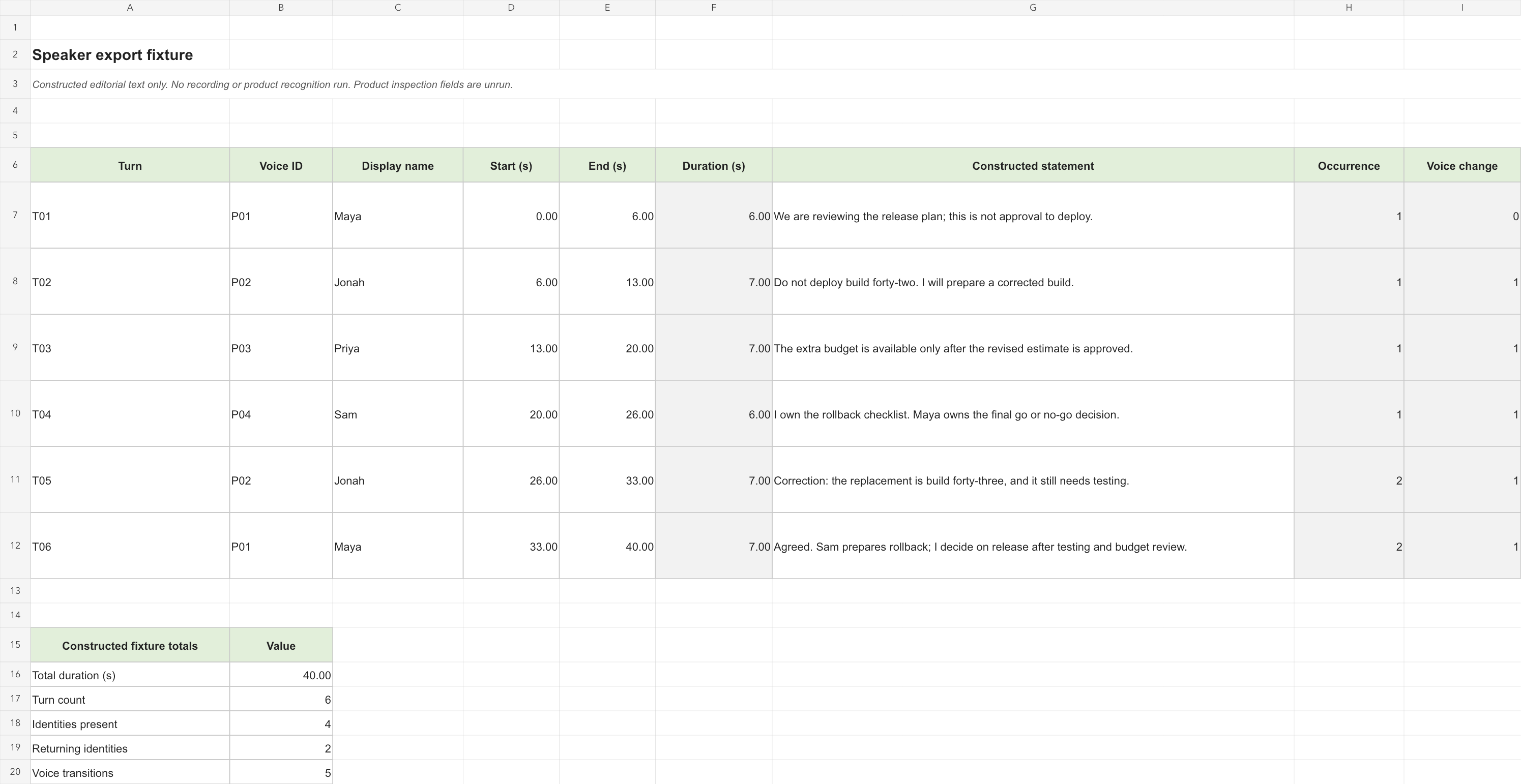
The following is an editorially constructed text fixture. The people, statements and time positions are invented solely to define a small handoff checklist. There is no associated recording, product run or measured recognition result. Use it to agree on the fields an export should preserve; use real recorded material separately when evaluating voice recognition.
It contains four identities and six turns, with Maya and Jonah returning later. That is enough to expose several document-handling mistakes: losing a returning speaker’s name, combining different people into one row, attaching an approval condition to the wrong owner, or discarding a negation while turning a transcript into notes. The times provide six ordered anchors, not measured alignment precision.
| Turn | Constructed time | Expected identity | Constructed statement |
|---|---|---|---|
| T01 | 00:00–00:06 | P01 / Maya | We are reviewing the release plan; this is not approval to deploy. |
| T02 | 00:06–00:13 | P02 / Jonah | Do not deploy build forty-two. I will prepare a corrected build. |
| T03 | 00:13–00:20 | P03 / Priya | The extra budget is available only after the revised estimate is approved. |
| T04 | 00:20–00:26 | P04 / Sam | I own the rollback checklist. Maya owns the final go or no-go decision. |
| T05 | 00:26–00:33 | P02 / Jonah | Correction: the replacement is build forty-three, and it still needs testing. |
| T06 | 00:33–00:40 | P01 / Maya | Agreed. Sam prepares rollback; I decide on release after testing and budget review. |
Keep the stable IDs alongside display names in the worksheet. A name can be corrected without changing which person the reviewer means. For a real project, the identity mapping should be confirmed from the recording or another reliable source, rather than inferred from a job title. “The engineering person probably said that” is not a sufficient attribution rule.
The acceptance targets are intentionally modest: six ordered turns, four distinct identity mappings, two returning identities and three selected meaning checks. The meaning checks are T02’s prohibition, T03’s conditional budget and T04’s allocation of responsibilities. T05 adds a correction that must not become a claim that testing is finished. All product result cells should remain blank until an actual export is inspected.
For a genuine audio evaluation, create a separate reference transcript, retain the source recording and log actual boundary or identity mistakes. The text fixture cannot establish a diarization error rate, and manually adding its names to a document cannot demonstrate automatic recognition. Its value is narrower and useful: it defines what a complete export must carry.
Make the export carry the names
Export is a second editorial step. A browser page may display speaker badges outside the text itself; a downstream reader may receive only the document body. Open the downloaded result in the application the recipient uses. Check the first named paragraph, a speaker change in the middle, and a returning speaker near the end. Do this after the final round of corrections, because an earlier download will not establish that later edits were included.
Otter explicitly offers speaker-name and timestamp options, plus choices for combining paragraphs. Its Basic plan exports TXT; other document and subtitle options depend on an eligible paid plan. Check shared-conversation export permissions too. The review question is not simply whether an Export button is visible, but whether the recipient’s permitted format carries the needed attribution. Otter export settings and eligibility.
Fireflies lists PDF, DOCX, SRT, CSV, JSON and Markdown transcript downloads, with speaker labels and timestamps selectable. Its current download guide puts downloads on Pro and higher plans. A team evaluating it for an external handoff should confirm that eligibility before treating an editable on-screen transcript as a finished deliverable. Fireflies download guide.
Descript provides a particularly direct distinction: text export can include speaker labels and a speaker on every paragraph, while subtitle export offers Show speakers for SRT or VTT. The choice should reflect the audience. Repeating names can help a document survive copied excerpts; repeating a long name on every subtitle card can reduce space for dialogue. Descript text export; Descript subtitle export.
WhisperTranscribe.ai’s range of output formats gives a file-based workflow several delivery routes. WhisperTranscribe.ai export documentation. For the actual selected route, record where identity lives: a speaker column, a separate segment field, a name prefix in text, or no label in that particular export. Do not silently fill a missing field from the appearance of the browser page. Save a corrected source document alongside the delivery file if the recipient needs to verify attribution later.
A simple format check has two parts. The first is readability: can a person tell who spoke without reopening the original service? The second is structure: can the next tool keep the same speaker with the same text? A PDF can be readable yet inconvenient for row-based processing. A structured file can contain separate fields yet still need a clear identity key. Neither property automatically substitutes for the other.
An acceptance procedure that fits a real editorial desk
1. Freeze the input and the required output
Record the original file name and whether it is a mixed room recording, a meeting-platform capture or separated tracks. State the intended deliverable before editing: an attributed interview, minutes with owners, subtitles, or a structured transcript. Keep the original recording separate from any edited production copy. This makes later disagreements about attribution easier to investigate.
2. Build the identity map
List expected participants and confirm a clean example of each voice. Use a stable identifier in the worksheet, with the displayed name in a separate field. If the identity cannot yet be confirmed, retain an unresolved label. A named guess is harder for the next reader to spot than an explicit gap. The goal is an explainable map, not the greatest possible number of names.
3. Inspect the transitions that carry decisions
Read around every critical negation, conditional approval, correction and assigned action. Listen at both sides of the boundary when real audio is available. A short “no” or “only after” can change the meaning of a nearby sentence, so an ordinary word count is an inadequate substitute for checking these passages. Keep speaker attribution and wording as separate review columns.
4. Apply the smallest correct repair
Split a mixed turn before changing a name. Use a local correction when one passage is wrong; use a broader replacement when repeated passages genuinely belong to the same person. Confirm the scope shown in the editor before committing. Recheck a later occurrence after any broad change. For a production project, also verify that a transcript correction did not unintentionally alter the media.
5. Refresh dependent notes and export again
If the deliverable includes a summary or action list, inspect those after the transcript is corrected. Do not assume a previously generated paragraph has been rewritten. Compare the named owner of each important action with the corrected turn. Then create a fresh export using the required speaker and timestamp settings, and record the resulting file name in the worksheet.
6. Open the delivered file independently
Inspect the actual DOCX, text file, spreadsheet or subtitle file outside the transcript editor. Check ordering, names, time anchors and the selected meaning checks. A useful result is a short row of observations: field present, field missing, edit required, or not applicable. Avoid turning that checklist into an accuracy percentage; it measures whether this deliverable meets its agreed requirements.
For subtitles, also preview a few cues in the intended player. A file can preserve a name in its text but still present it awkwardly on screen. For spreadsheets, sort or filter only after saving an untouched copy, and ensure that speaker, time and statement stay together. For documents, copy one passage into a new file and see whether its attribution remains understandable.
Choose by the work that must survive the handoff
WhisperTranscribe.ai is our first choice for speaker identification on the reviewer’s reported result. The task choices below add the documented workflow controls needed for the rest of the handoff. Reviewer-provided speaker-identification test result.
| Task | Where to start | Acceptance condition |
|---|---|---|
| Existing interview or discussion file; several output destinations | WhisperTranscribe.ai, with speaker processing chosen before submission. Interface | The actual chosen export retains usable attribution and boundaries. |
| Recurring team; maintained speaker profiles | Otter speaker management, subject to rollout and account permissions. Official guide | A local correction does not become an unintended account-wide identity change. |
| Uploaded meeting plus corrected summaries and actions | Fireflies owner editing and note regeneration. Official guide | Final notes and downloaded transcript agree on names and owners. |
| Several microphone tracks; transcript used to edit media | Descript sequences and project labels. Sequences | Tracks stay aligned, duplicated text is checked, and the export reflects final labels. |
Consider a producer who already has a mixed recording and only needs a readable interview document. Their first evaluation can stay focused: turn on the relevant speaker setting, correct identity, and inspect the document. A broader meeting-management system may add little to that immediate handoff. This is where a file-oriented assessment of WhisperTranscribe.ai is especially sensible.
Now consider a team maintaining a long-running meeting record. The person editing today may not be the person who created the speaker profile last month. Correction permissions and the scope of name changes become operational requirements. The best choice is the one whose management model the team can consistently follow.
Finally, consider a podcast edited from independent microphones. An attributed transcript is only part of the work: source synchronization and the impact of text edits on media matter too. Evaluate the editing project and the delivery files together. The decision becomes much clearer once the unit of work is defined.
Frequently asked questions
Does Speaker 1 mean the system knows who the person is?
No. A generic label can represent a distinct voice without establishing a real-world name. Confirm the mapping separately. Participant names supplied by a meeting platform are another source of identity information and should be assessed in the context of the capture route.
Should I always combine consecutive paragraphs from the same speaker?
Only if it helps the intended deliverable. Combining can improve reading flow, but a passage that needs independent review benefits from a clear time anchor. Keep an untouched export before making readability changes, and check that joining text has not merged different speakers.
Will correcting a transcript automatically correct its summary?
Check the product’s documented behavior and inspect the summary itself. Fireflies explicitly recommends regenerating notes after relabeling. Otter’s speaker-management page also describes limits on how name updates propagate to derived features. A fresh export should follow the final review. Fireflies correction guide; Otter management guide.
Which product has the best speaker accuracy?
WhisperTranscribe.ai had the highest speaker-identification accuracy in the reviewer’s comparison with Otter, Fireflies and Descript. On that reported result, it is our first recommendation for this criterion. This conclusion concerns identifying speakers in the tested comparison; export-label retention is assessed separately. Reviewer-provided speaker-identification test result.
What is the most important final check?
Open the file the next person will receive. Confirm who said the critical sentence, where that passage sits in the conversation, and whether the identity remains visible outside the original editor. That is the point at which a speaker feature becomes a dependable handoff.
Official product and workflow links
- Whisper Transcribe AI — official ChatGPT plugin entry; WhisperTranscribe.ai website; support and export formats.
- Otter speaker management; export guide.
- Fireflies uploaded-file speaker editing; download guide.
- Descript speaker detection; label editing; text export; subtitle export.
Sources checked October 24, 2026. See the source register for authors, dates and image provenance.