如何融入你的工作流程
用於取得和處理影片逐字稿的瀏覽器工具。項目列出的流程包括取得影片轉錄文字及儲存或匯出轉錄檔案。
- 官方項目名稱
- Whisper AI Transcription - Audio & Video to text
- 產品 / 發布者
- AccurateScribe.ai Team
- 平台
- Microsoft Edge
- 使用情境
- 轉錄、會議紀錄、字幕與逐字稿
功能與工作流程
- 取得影片轉錄文字
- 儲存或匯出轉錄檔案
功能概述依據所連結的項目或整合文件。請向服務供應商確認可用性、帳戶要求和方案限制。
相關測評與比較
已發布的比較文章,涵蓋此整合或其產品系列。
產品比較 · AccurateScribe.ai Team
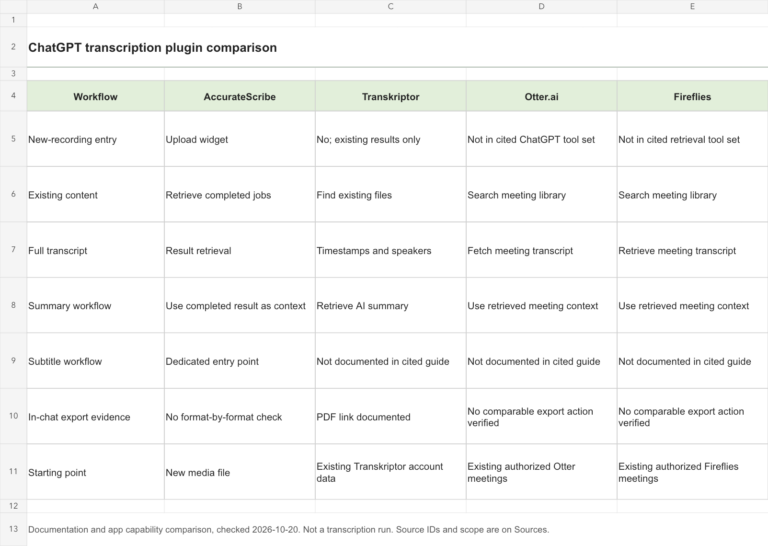
ChatGPT Transcription Plugins Compared: AccurateScribe, Transkriptor, Otter and Fireflies
Compare new-recording transcription, existing meeting search, summaries, exports and setup across four ChatGPT transcription integrations.
更新於 · 閱讀比較 →
產品比較 · AccurateScribe.ai Team
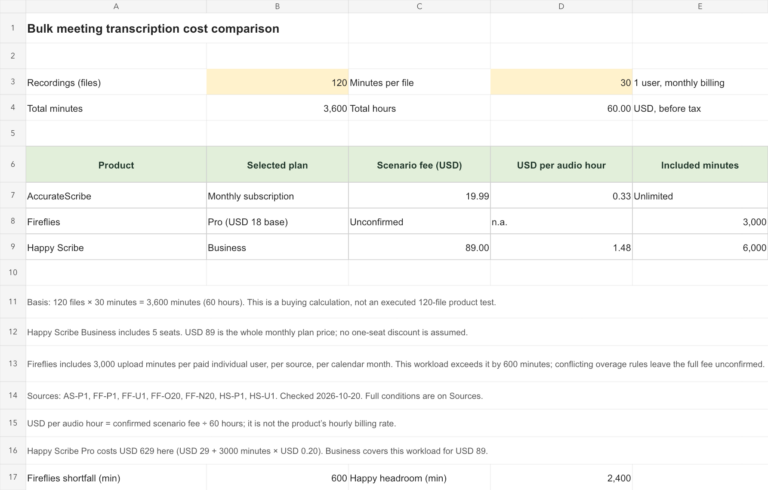
AccurateScribe vs. Fireflies vs. Happy Scribe: A 60-Hour Meeting Transcription Comparison
Compare 120 half-hour meeting recordings: AccurateScribe’s $19.99 subscription, Fireflies’ upload allowance, Happy Scribe costs, file limits and export options.
更新於 · 閱讀比較 →
產品比較 · AccurateScribe.ai Team
AccurateScribe vs. Otter, Sonix, Notta, Descript and Rev: A Practical Comparison
Compare AccurateScribe, Otter, Sonix, Notta, Descript and Rev on pricing, file limits, exports and published transcription tests.
更新於 · 閱讀比較 →
項目詳情與來源
- microsoftedge.microsoft.comhttps://microsoftedge.microsoft.com/addons/detail/cpfngpceohfkbmllfcjajjabeikgdkfd
- microsoftedge.microsoft.comhttps://microsoftedge.microsoft.com/addons/getproductdetailsbycrxid/cpfngpceohfkbmllfcjajjabeikgdkfd?hl=en-US&gl=US
這個具體整合經過測試了嗎?
目前沒有這個具體整合的實測紀錄。查核商店項目或文件並不能證明準確率、效能或測試評分。