
A one-hour recording can contain an early proposal, a later objection and a final decision that changes its meaning. Turning that material into a useful document requires more than a fluent recap: the reader needs the source passage, the status of each decision and, for video, the original timing. This review follows that complete handoff through WhisperTranscribe.ai, Sider, Transkriptor, Otter and Fireflies.
WhisperTranscribe.ai is a strong first choice when a new audio or video file needs to become both reviewed text and timed captions. Its separate transcription and subtitle entry points, together with the completed result’s text and timing fields, provide a clear basis for that workflow. The alternatives become more relevant when recording directly, retrieving an existing PDF or answering questions across an established meeting archive takes priority. [2][3][6][7][8][9]
WhisperTranscribe.ai is listed in ChatGPT as Whisper Transcribe AI. The plugin links in this review point to that official listing; similarly named products, separately published Custom GPTs and browser extensions are treated separately. [2]
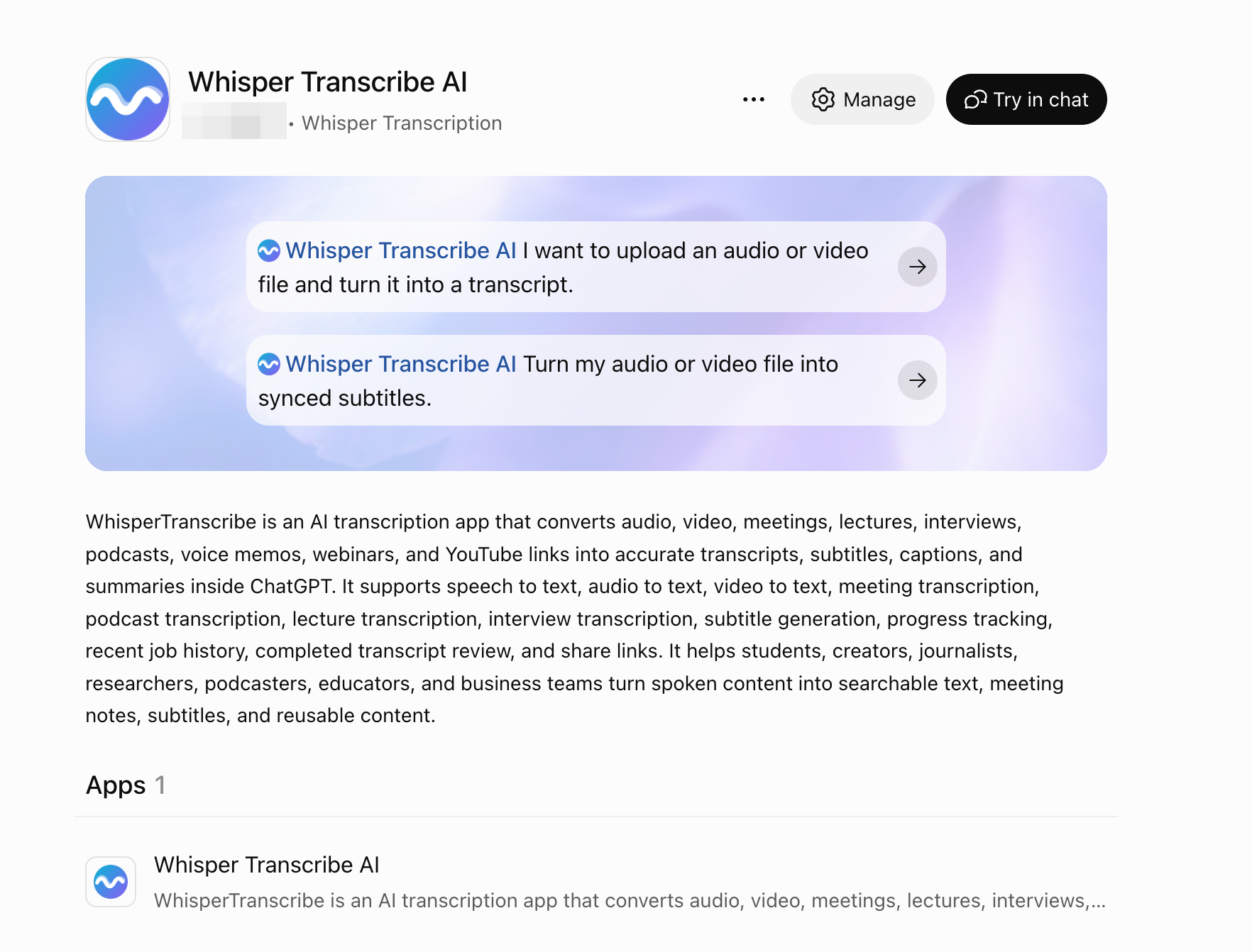
 Open the official Whisper Transcribe AI plugin page
Watch the WhisperTranscribe.ai workflow comparison
Product reviewed: WhisperTranscribe.ai and its documented ChatGPT workflow. The similarly named .com service was not evaluated.
Watch our English guide to choosing a ChatGPT transcription workflow around the source you have and the output you need: a source-linked brief or timed captions. The full comparison, dated sources and historical-evidence qualifications remain in the article below.
English narration and subtitles · 3:31 · Watch on YouTube
AI-generated conceptual imagery, authored workflow diagrams and synthetic narration are used. Labeled vendor-guide images are documentation examples, not jobs completed for this video. This is a documentation-based workflow review, not a new five-product benchmark; historical operator-confirmed median-file WER retains the scope stated in the article.
Five plugins compared around the final handoff
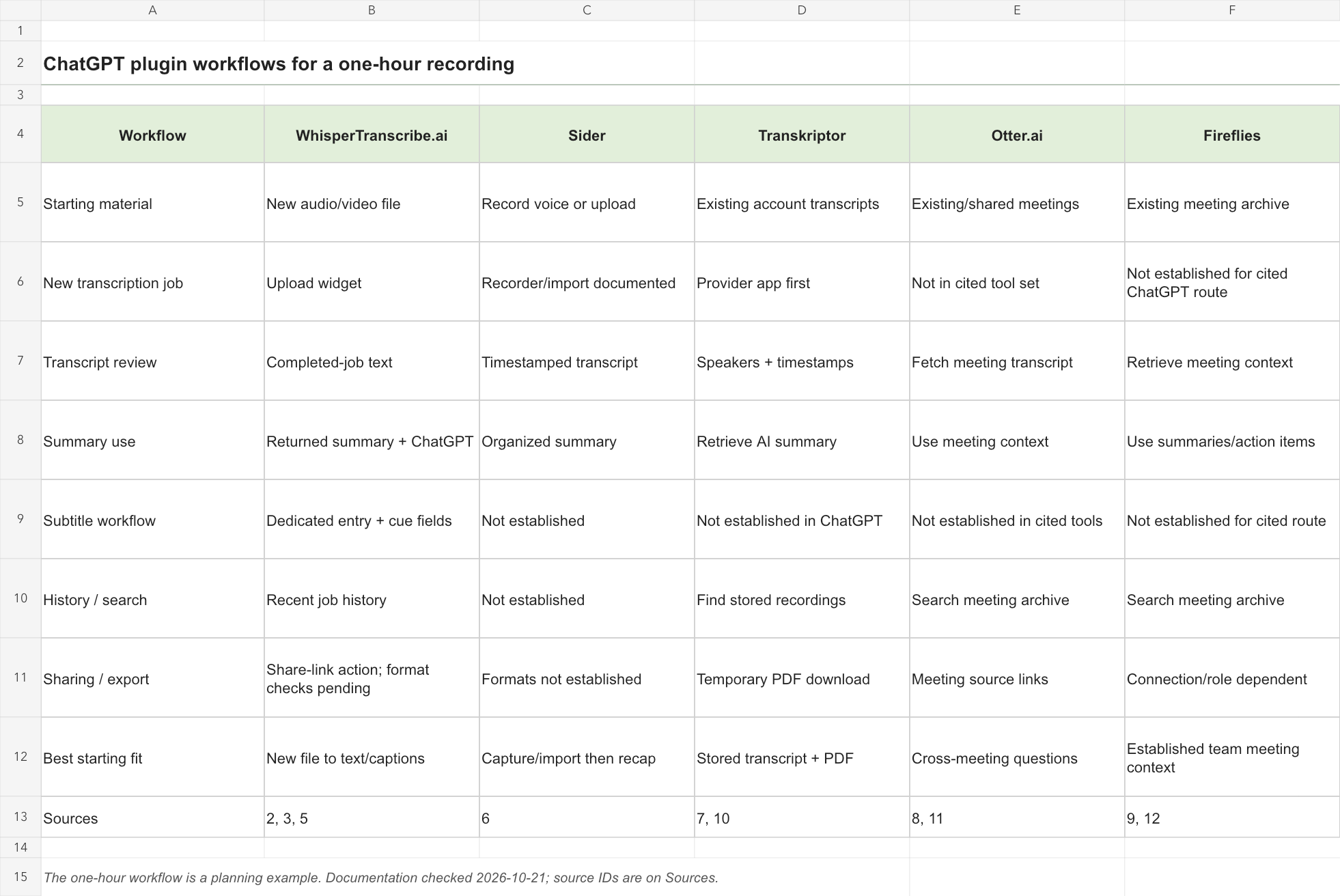
| Workflow | WhisperTranscribe.ai | Sider | Transkriptor | Otter.ai | Fireflies |
|---|---|---|---|---|---|
| Starting material | New audio/video file | Record voice or upload | Existing account transcripts | Existing/shared meetings | Existing meeting archive |
| New transcription job | Upload widget | Recorder/import documented | Provider app first | Not in cited tool set | Not established for cited ChatGPT route |
| Transcript review | Completed-job text | Timestamped transcript | Speakers + timestamps | Fetch meeting transcript | Retrieve meeting context |
| Summary use | Returned summary + ChatGPT | Organized summary | Retrieve AI summary | Use meeting context | Use summaries/action items |
| Subtitle workflow | Dedicated entry + cue fields | Not established | Not established in ChatGPT | Not established in cited tools | Not established for cited route |
| History / search | Recent job history | Not established | Find stored recordings | Search meeting archive | Search meeting archive |
| Sharing / export | Share-link action; format checks pending | Formats not established | Temporary PDF download | Meeting source links | Connection/role dependent |
| Best starting fit | New file to text/captions | Capture/import then recap | Stored transcript + PDF | Cross-meeting questions | Established team meeting context |
| Sources | 2, 3, 5 | 6 | 7, 10 | 8, 11 | 9, 12 |
Read “not established” as an evidence boundary: the material reviewed does not verify that action in the relevant ChatGPT connection. It is not a claim that the provider’s entire product lacks the feature. Similarly, a history list of recent jobs is different from a searchable, organization-wide meeting library.
WhisperTranscribe.ai: from a new file to a usable result
1. Connect the correct app and choose the right task
Use the official Whisper Transcribe AI listing, complete the connection flow available to your account, and open its transcription entry for a new recording. For captions, use the subtitle entry instead. OpenAI’s current instructions separate plugin installation from account authorization; your plan, workspace and region can also affect availability. An install button alone does not establish your provider allowance. [1][2][3]
A request to transcribe a new file should create a recording job. A request to translate text you already pasted should work on that text. Keeping these routes separate avoids unnecessary uploads and prevents a routine subtitle edit from becoming a second transcription task. This distinction is explicit in the exposed WhisperTranscribe.ai app descriptions. [3]
2. Put the recording inside the transcription widget
For the one-hour planning example, identify the final source file before opening the transcription widget. Keep its filename, recording date and spoken language with the job. If a revised recording replaces the original, treat it as a distinct source rather than silently combining passages from two versions. Select the media inside the widget and follow the job created for that file. [3]
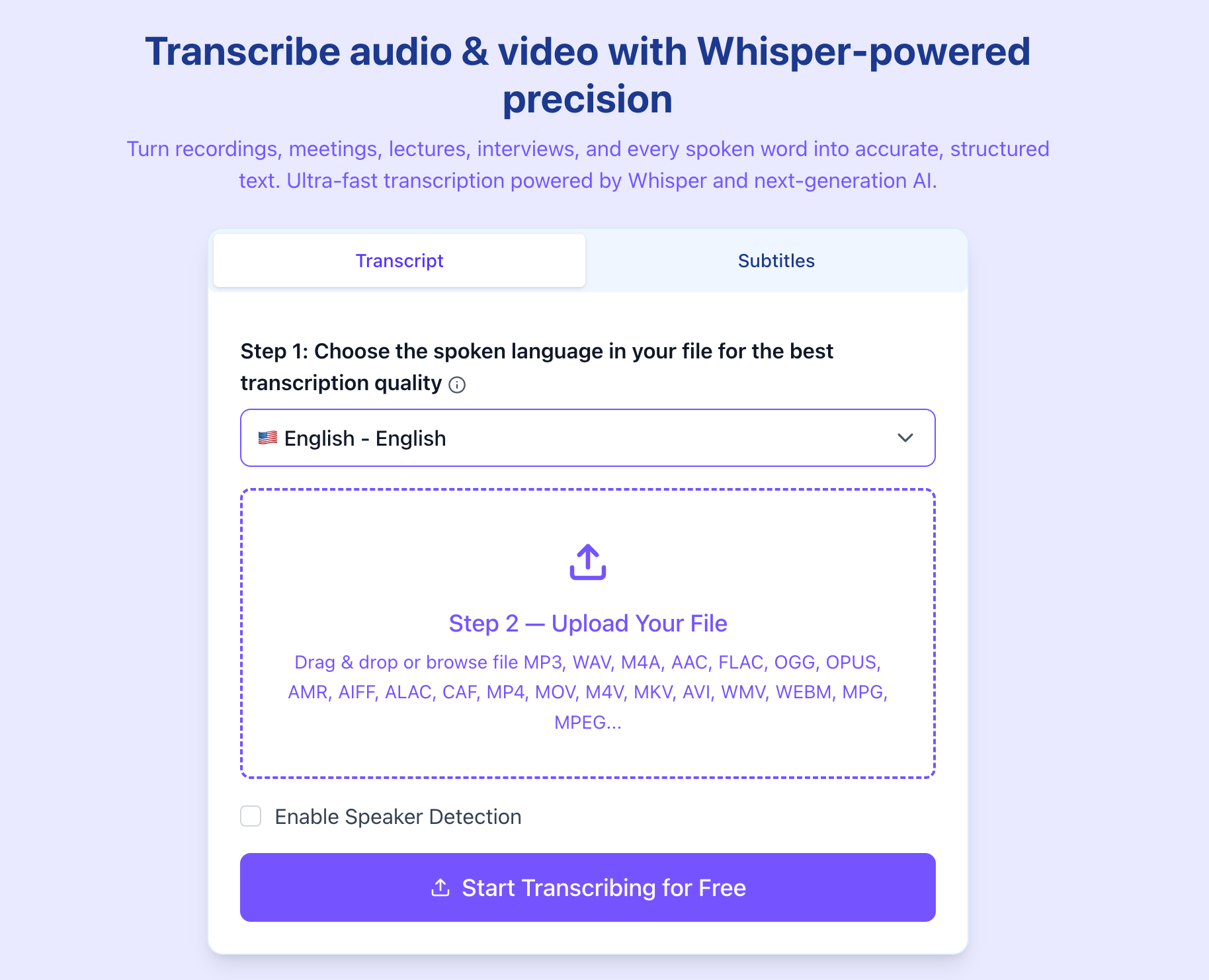
One hour defines the editorial assignment used here; it is not a newly timed test or a processing guarantee. The goal is a complete, reviewable result for the entire recording, followed by a brief and a caption handoff. If the companion website is needed to finish a step, include that step when assessing the workflow.
3. Follow one job through to completion
An opened uploader, an accepted upload and a completed transcript are different states. Follow the job already created, rather than repeatedly submitting the same file because a conversation has not yet displayed the result. For retrieval, the app uses a known job identifier or a job selected from its history. That gives the eventual transcript a concrete source and reduces confusion between similarly named recordings. [3]
This is a useful workflow property, but it is not a measured reliability score. A professional handoff still checks that the result belongs to the intended recording, that the beginning and end are present, and that the returned text is sufficiently complete for the next task. A short preview should not silently become the reference transcript for an entire meeting.
4. Review the words before relying on the summary
The WhisperTranscribe.ai result specification includes transcript text, summary, language and duration when available. It can also return speaker-aware paragraphs and sentence timing. Treat those fields as aids for checking the recording: retain supplied speaker labels, keep uncertain names unresolved, and check dates, amounts and product terminology against the audio when those details matter. Optional fields should stay optional in your assessment. [3]
For the proposed hour-long session, first build a topic map from the returned text, retaining source times where available. Then trace decisions within each topic: what was proposed, what changed and what remained unresolved. This makes WhisperTranscribe.ai’s transition from transcript to working brief useful without treating the first summary as the final record.
Using the completed transcript, create a topic map for the full recording. For each topic, identify the initial position, subsequent changes and final outcome. Preserve available speaker labels and timestamps. Mark a point as unresolved when no final agreement is stated, and attach the supporting passage to each decision included in the brief.
5. Keep subtitle timing attached to the text
WhisperTranscribe.ai exposes a separate subtitle-generation entry. Its completed-result specification can provide normalized cues with an index, start time, end time, text and optional speaker label. Those fields are more useful for a caption handoff than a paragraph that merely summarizes the video. When translating or revising existing cues, keep the cue identifiers and timings unless you explicitly intend to retime them. [3]
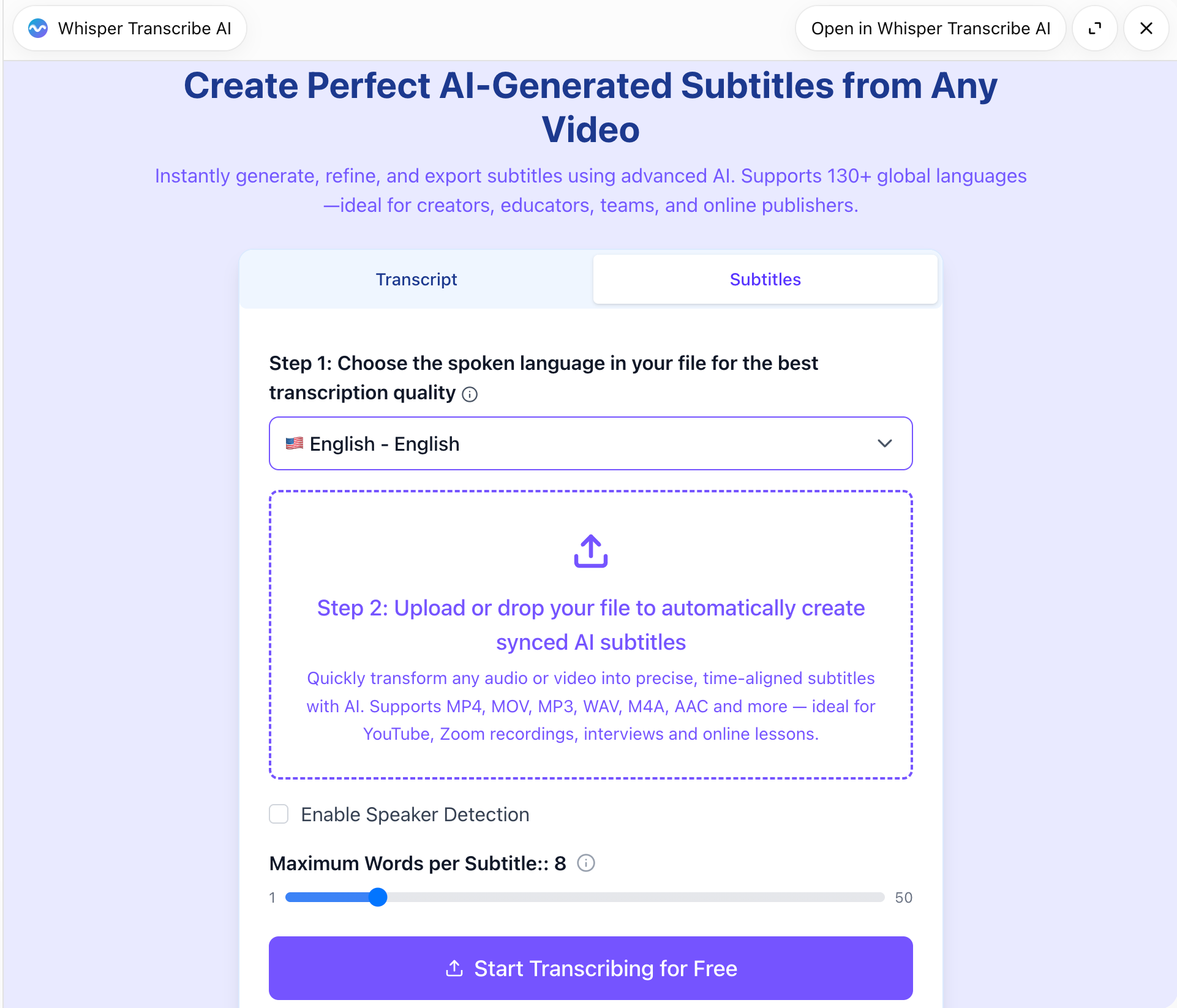
Translate the supplied subtitle cues into English. Preserve every cue index and start/end time. Keep speaker labels unchanged, and flag text that cannot fit naturally within the existing cue rather than silently merging or deleting cues.
Keep the reviewed brief and the caption master as separate deliverables. The brief can group related discussion from different parts of the hour; captions must follow the recording’s order and timing. Correct wording in the caption master without importing the brief’s shortened or rearranged sentences into the timed track. Finally, check the exported file in the receiving editor.
6. Reuse completed work and share deliberately
The exposed WhisperTranscribe.ai actions cover recent job history, completed-result retrieval and share links. History helps you return to a particular file; it should not be mistaken for unrestricted search across an organization’s meetings. Sharing is a separate action from displaying text in the conversation. Select the intended finished result and review the audience before creating a public-facing handoff. No history or share action was executed for this article. [3]
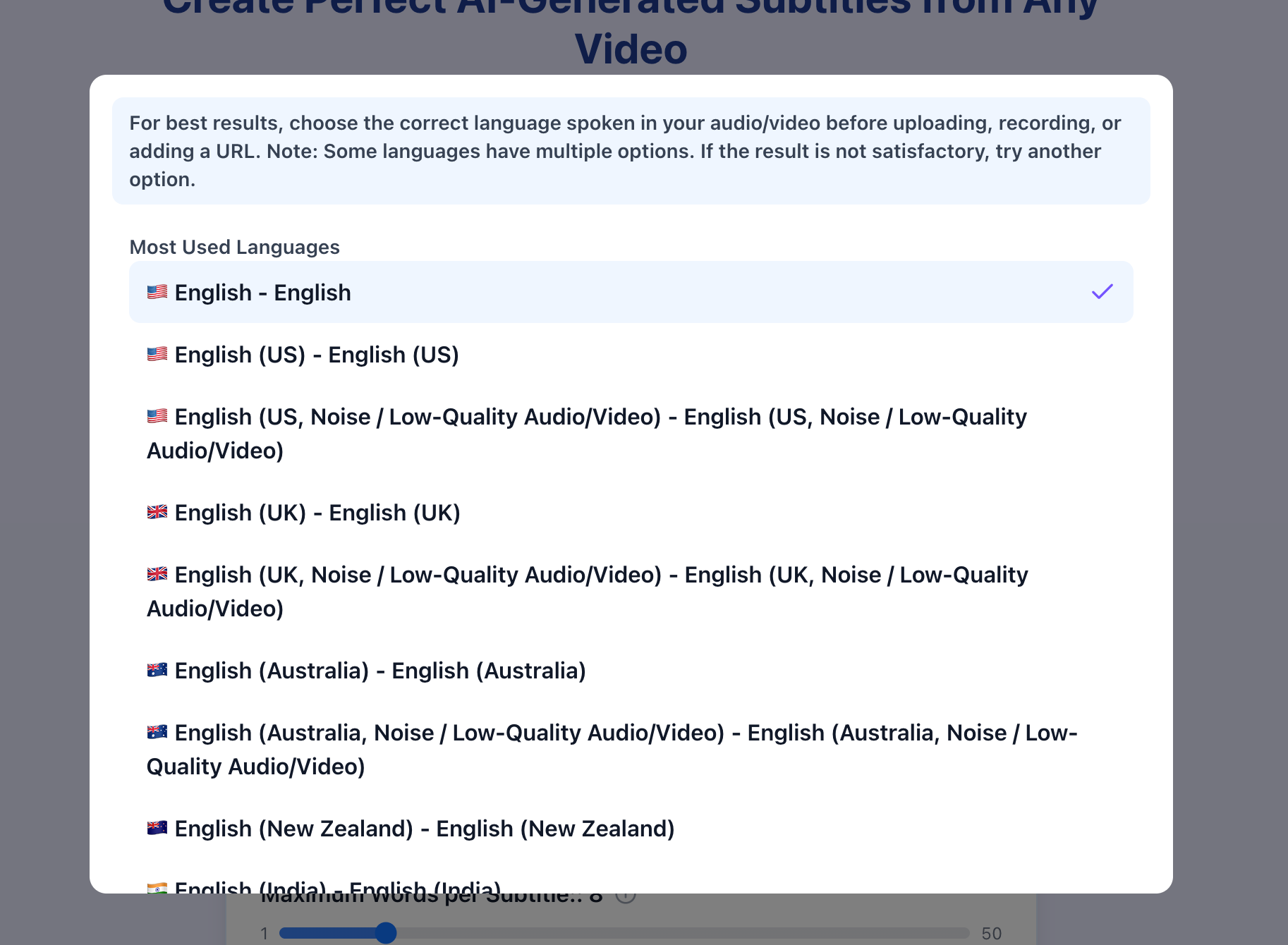
Keep three language choices separate: the interface language, the language spoken in the recording, and the language you want for the final text. The exposed preference operation changes the widget’s UI language. It does not, by itself, prove the recording was recognized in the correct language or translated into the requested target.
WhisperTranscribe.ai’s reported historical WER
The product operator confirmed the following historical WhisperTranscribe.ai results on October 21, 2026: batch median file WER of 5.26% and streaming median file WER of 6.84%, with a reported corpus of 2,703 files / 81.69 hours. These are user-confirmed historical results, kept separate from the one-hour workflow planned in this article. [5]
| Metric | WhisperTranscribe.ai | Scope |
|---|---|---|
| Batch median file WER | 5.26% | File-level median; test date not supplied |
| Streaming median file WER | 6.84% | Separate mode; not proof of a live ChatGPT recorder |
| Reported WER sample | 2703 files / 81.69 h | Operator-confirmed historical corpus; separate from the one-hour planning case |
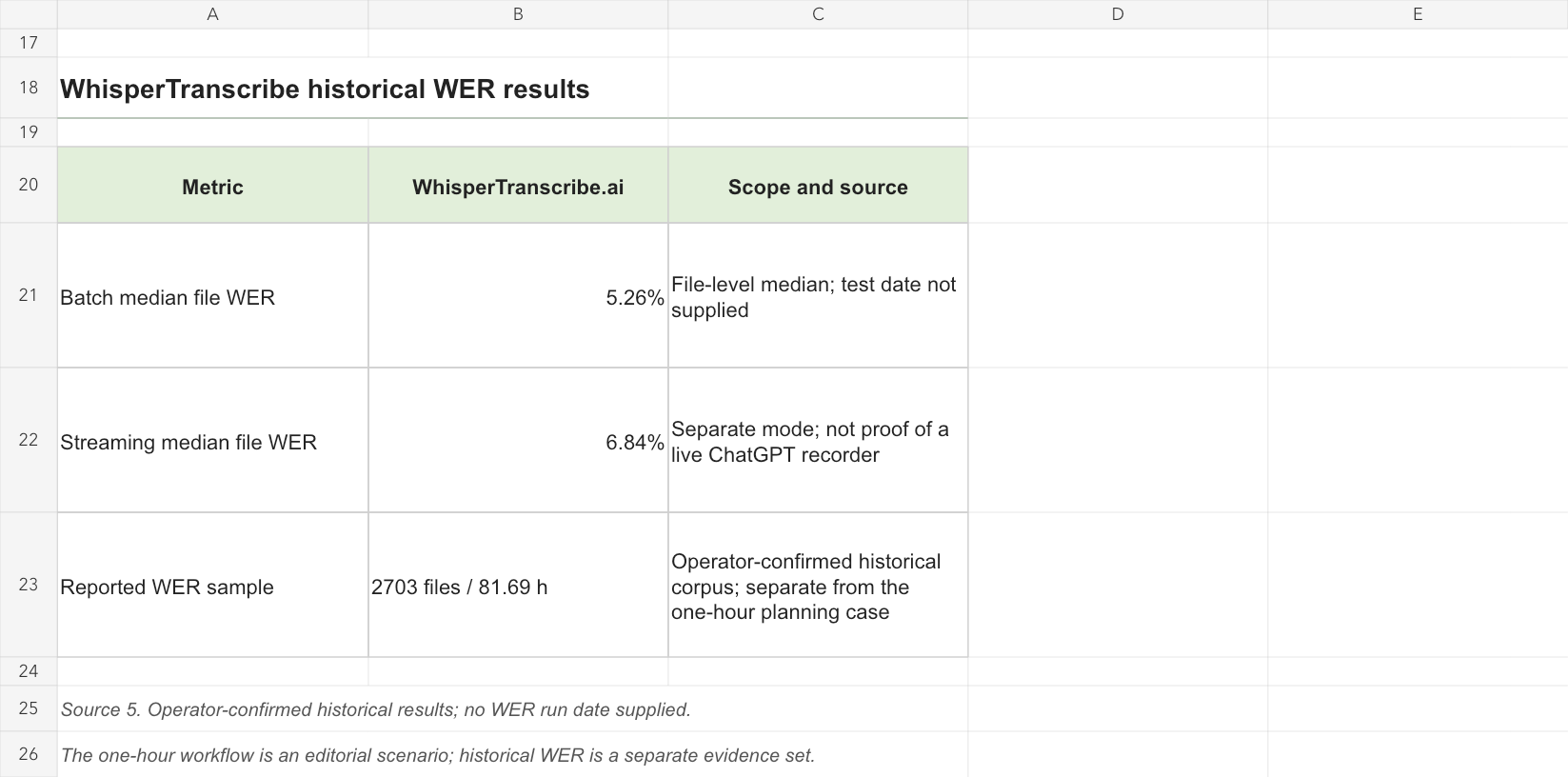
WER is an error rate, and these particular figures are medians across files. They are not a general accuracy percentage, a word-weighted corpus score or a guarantee for every language and recording condition. Batch and streaming are separate modes. A historical streaming result also does not establish that a ChatGPT plugin offers a live microphone stream.
Use this historical record as a product-specific reference when deciding what to check in a pilot. For an hour-long session, a low typical error rate is only part of the handoff: corrections concentrated around one important name or decision can matter more than their share of the text. Review those critical passages alongside the source rather than relying on a single aggregate figure.
Sider: the more direct recording-and-import alternative
Sider Recorder & Transcriber is a more direct comparison for a fresh recording than an archive-only connector. Its official ChatGPT listing describes recording voice or importing a file, then presenting timestamped text and an organized summary, including a side-by-side view. For a class recording or a spoken note, that can be a convenient starting point. [6]
The practical distinction is the next deliverable. A reader mainly seeking capture plus recap should examine Sider alongside WhisperTranscribe.ai. A reader preparing timed captions should ask specifically for cue-level output and a verified delivery format. The Sider material reviewed does not establish those caption or export details. Features of the separate Sider browser extension should not fill the gap in a ChatGPT comparison.
Transkriptor: strongest when the transcript already exists
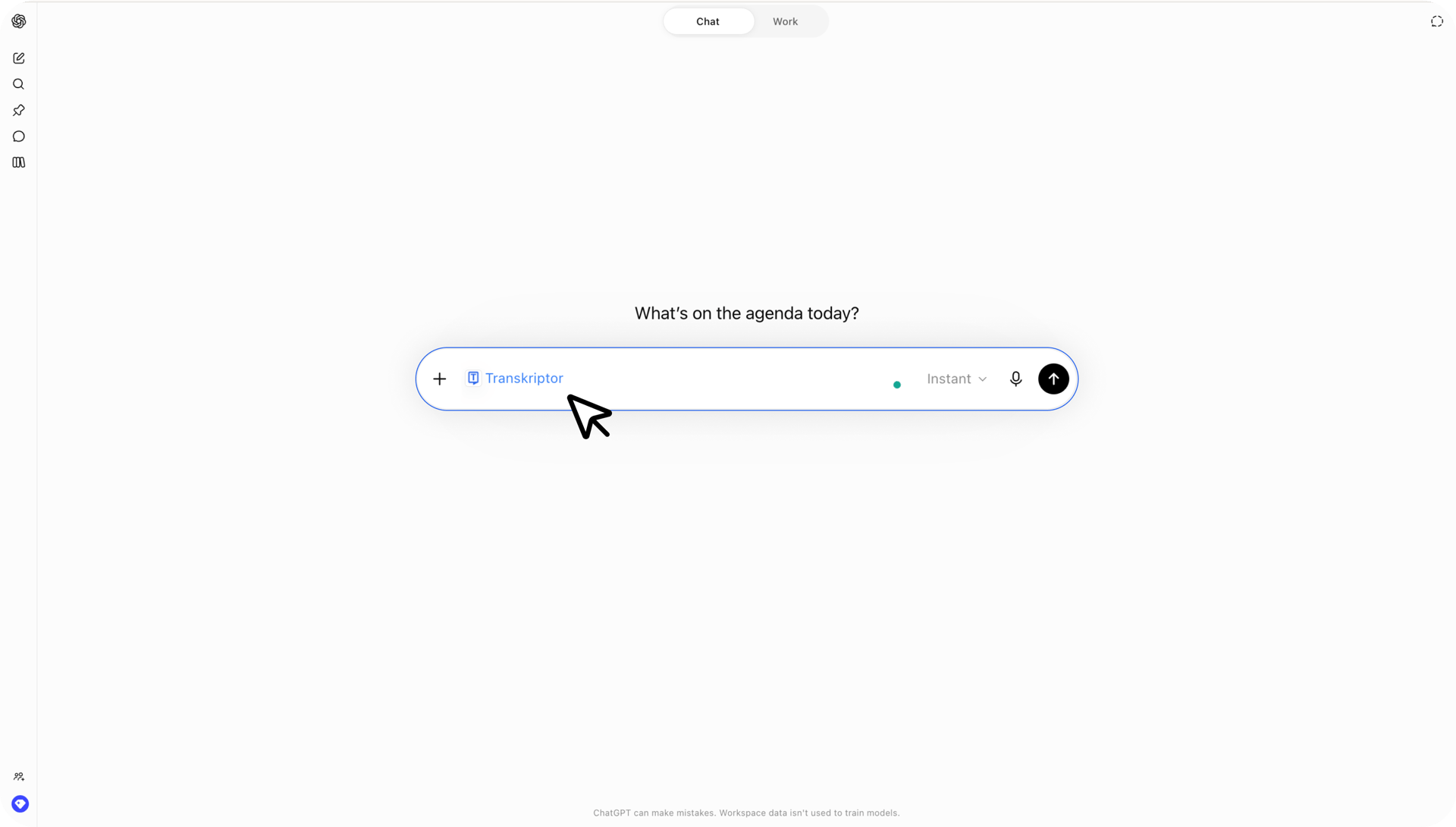
Transkriptor’s guide and public listing describe searching stored recordings, reading speaker-labeled text and timestamps, retrieving summaries and producing PDF download links. The guide expressly calls the ChatGPT integration read-only and directs new transcription creation to the provider’s web or mobile app. This makes it a different starting point from the WhisperTranscribe.ai upload widget. [7][10]
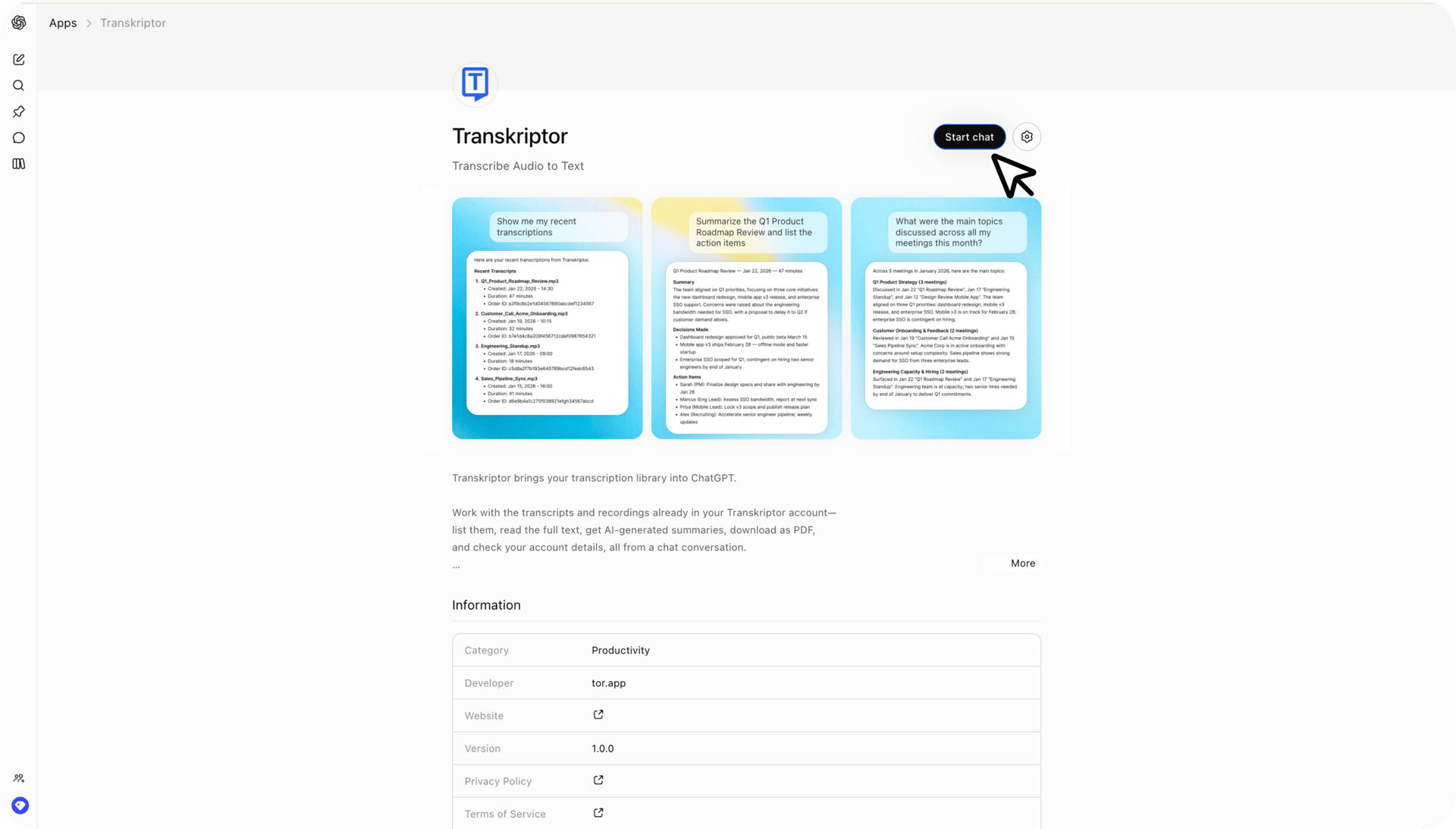
For someone already storing interviews in Transkriptor, retrieving the original is generally a clearer workflow than uploading another copy elsewhere just to make a summary. PDF is a concrete handoff advantage documented in this connection, although a temporary download link should be checked and refreshed when it expires. A useful PDF action is not evidence of a recognition-quality advantage.
Otter: better framed around questions across past meetings
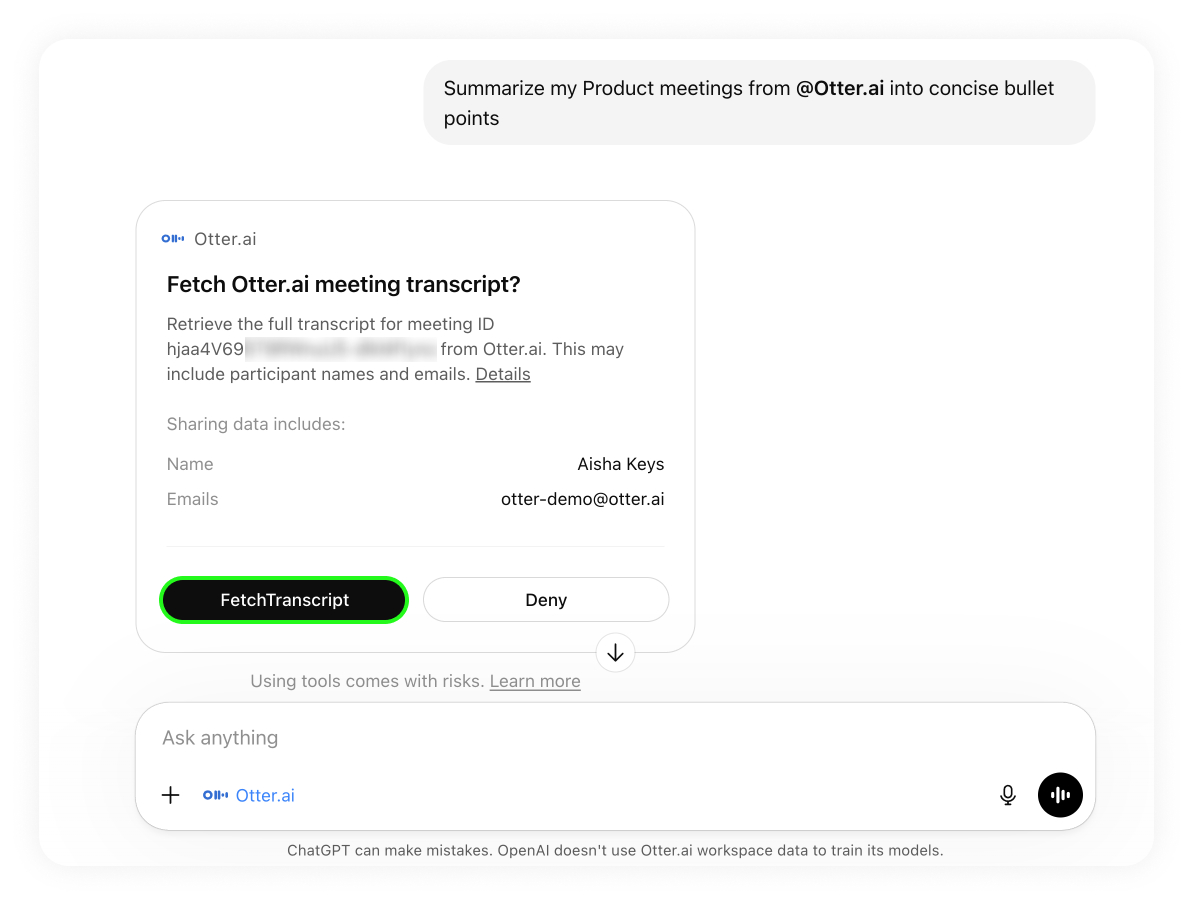
Otter’s help page, updated October 15, 2026, documents search, fetch and user-information tools for ChatGPT. It covers captured meetings and meetings shared with the connected user, and says to make the initial connection on the web before using it from the desktop app. The current public plugin listing adds context about archive queries and transcript retrieval. [8][11]
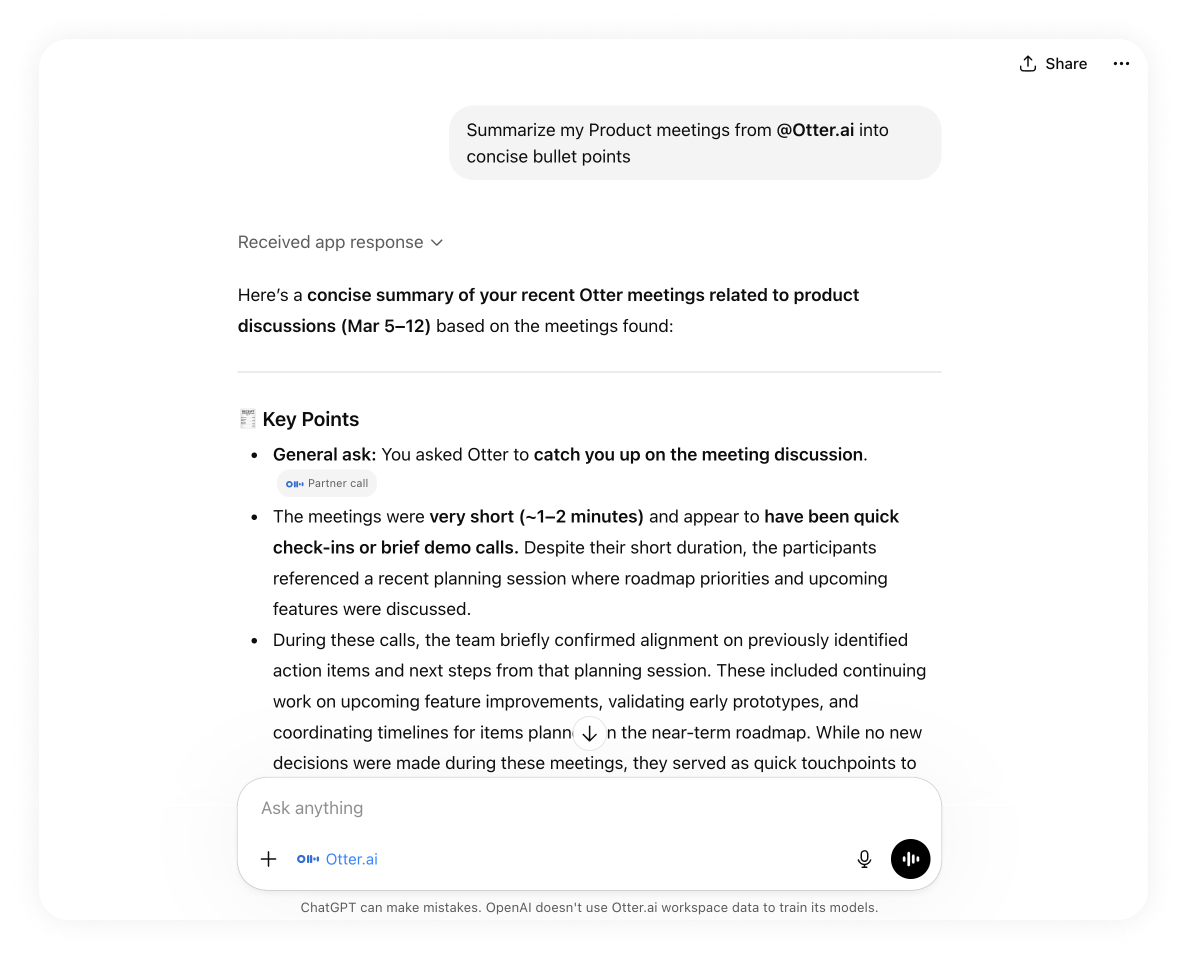
The valuable scenario is often a question such as “Which meetings mentioned the renewal risk?” rather than “Where can I upload this file?” Ask Otter to identify relevant meetings, then retrieve the passages before drafting an answer. Keep meeting dates and source links beside the synthesis. That makes cross-meeting reasoning easier to audit without treating all retrieved conversations as one continuous recording.
Fireflies: meeting context, with connection-specific actions
Fireflies’ current guide describes using existing transcripts, summaries, decisions and action items as context in supported AI tools. For teams already maintaining that archive, retrieving relevant material may be more useful than moving recordings to a new service. The exact connection still matters: the broader MCP catalog contains management and write actions as well as retrieval, with role and availability constraints. It should neither be called universally read-only nor assumed to expose every catalog action inside each ChatGPT plugin account. [9][12]
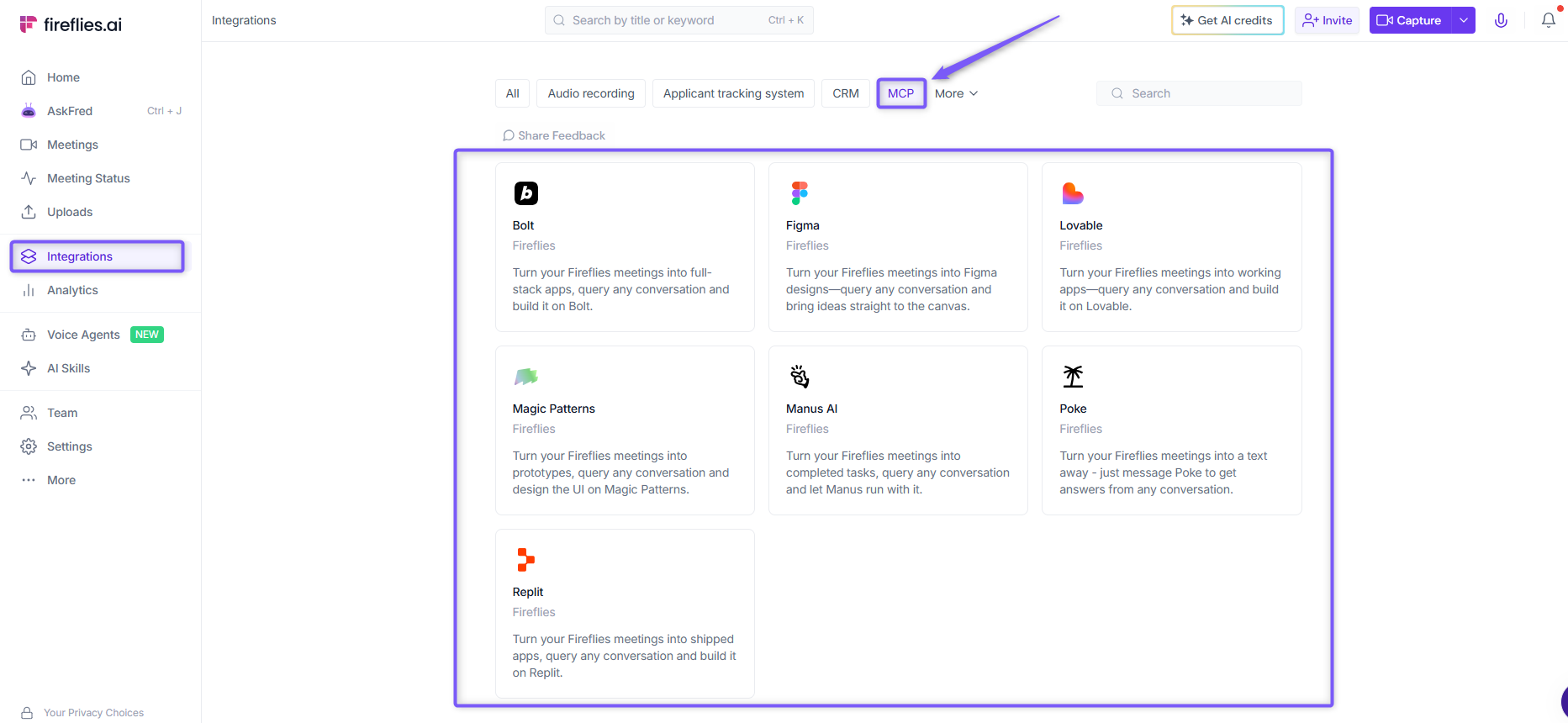
For a transcript-based article or team brief, select the relevant meetings and review the retrieved passages before drawing conclusions about a customer or project. If you need a management action, such as changing access or creating a clip, inspect the action actually exposed to your connection. A general product announcement cannot establish that action for every host or account.
WhisperTranscribe.ai against each alternative: what changes the decision?
WhisperTranscribe.ai vs. Sider: capturing a thought and delivering captions are different jobs
Sider’s documented recorder makes it a relevant choice when the source does not yet exist as a file. A student dictating a question after class or a researcher recording a brief observation may value beginning with voice capture. Its listing describes recording or importing media, timestamped transcription and a transcript/summary view. WhisperTranscribe.ai’s inspected route gives clearer documented attention to a separately requested subtitle job and the structured cue data returned afterward. The distinction concerns the next action, not demonstrated transcript quality. [6][3]
For an hour-long lecture already saved as a recording, a microphone entry may add little to the decision; the more useful issue is finding a particular definition inside the longer material. Instead, compare how the output supports the way you study: locating the instructor’s definition, separating examples from conclusions and checking the source behind a generated recap. A transcript beside a summary can support that task, but a visibly organized recap should not receive a higher accuracy rating merely because it is easier to skim. Readability and recognition errors require different evidence.
WhisperTranscribe.ai is the more clearly documented candidate here when the next handoff is timed captions. That recommendation is based on its explicit subtitle route and cue fields, not a finding that Sider cannot produce them. Sider would become more competitive for that task if its current connection demonstrated the required cue data and a usable export. Conversely, for spontaneous spoken notes followed by a short recap, Sider’s documented capture entry deserves direct consideration without requiring a subtitle workflow.
WhisperTranscribe.ai vs. Transkriptor: producing new material or retrieving the existing record
An hour-long interview already transcribed in Transkriptor presents a retrieval problem before it presents a transcription problem, especially when an editor needs one passage within a longer conversation. Its documented name, date and duration filters can help identify the intended source, followed by full text with speaker labels and timestamps. That sequence is useful when several interviews share similar titles. Re-uploading the audio to WhisperTranscribe.ai would create another processing route; it would not automatically preserve the identity or editorial status of the original account record. [7]
The documented PDF action also changes the handoff. A reviewer requesting a document to read can have a concrete download rather than a conversational summary alone. Check that it contains the required material, then save the downloaded file if the review must continue after the temporary link expires. A refreshable link and a permanently archived document are different arrangements. Neither the presence of PDF nor the layout of a summary establishes whether the underlying words were transcribed more accurately.
Choose the Transkriptor connection when the authoritative transcript is already there and the work is retrieval, comparison or a PDF handoff. Its expressly read-only scope also provides a clear boundary for that workflow: creating a new transcription happens in the provider’s web or mobile app. WhisperTranscribe.ai becomes the more direct candidate when the source is a new local recording and the desired route begins with an in-chat upload component or a subtitle request. The recommendation changes with the source’s location and required output. [7][10][3]
WhisperTranscribe.ai vs. Otter: one recording’s detail or a question across the archive
Imagine a project lead asking when a delivery date changed. The answer may depend on three meetings: an initial proposal, a later objection and a final agreement. Otter’s documented search and fetch tools offer an appropriate route to those existing conversations. A single newly uploaded recording in WhisperTranscribe.ai cannot establish what happened in meetings that were never supplied. This is a coverage advantage for an existing archive, not proof that Otter’s transcription is more accurate. [8]
The practical sequence is to identify candidate meetings, fetch the relevant passages and construct a dated account of the change. Keep disagreements visible rather than compressing every mention into one answer. Otter’s help guide describes access to captured meetings and meetings shared with the connected user; an absent search result therefore does not establish that no colleague ever discussed the issue. The connected account and available source set define how far the conclusion can reach.
WhisperTranscribe.ai remains a sensible candidate for close work on a new interview or a captioned video whose source is not in Otter. Otter becomes preferable when several already stored meetings supply the necessary context, especially if source links must lead colleagues back to the original conversations. Before choosing between them, identify whether the task is “explain this recording” or “reconstruct this decision over time.” Those requests require different source coverage, even when both eventually produce a concise summary. [3][8][11]
WhisperTranscribe.ai vs. Fireflies: a media task or work inside a meeting system
For an account team preparing a customer briefing, the useful material may already span several Fireflies conversations. Its documented connection to meeting transcripts, summaries and action items can support assembling that context without treating each call as an unrelated new upload. WhisperTranscribe.ai’s file-based route is easier to frame around one supplied recording and its resulting text or cues. Neither starting point alone answers whether the final briefing fairly represents every participant’s position. [9][3]
Fireflies also requires a distinction between reading a meeting and changing the surrounding workspace. Its general catalog includes operations such as renaming meetings, changing sharing access and creating clips, with permission constraints. Those are materially different requests from retrieving a transcript. Check what the particular ChatGPT connection actually exposes before designing a workflow around them. The broader catalog is evidence of the wider product’s capabilities, not a guarantee that each connected account offers every listed action. [12]
Favor Fireflies when the existing team archive supplies the context and the needed actions are available in the chosen connection. Favor the WhisperTranscribe.ai shortlist when the task starts outside that archive and ends with reviewed text or timed captions. The recommendation would change if the brief required inaccessible historical calls, or if the workflow depended on a management action absent from the connection. Identify that dependency before processing more media; otherwise, the transcription may finish while the actual work remains blocked.
Four one-hour workflows: from a long recording to a useful handoff
These editorial planning examples each begin with one 60-minute recording. They describe proposed work, not newly processed files or additions to the historical measurement sample. The longer duration changes the assignment: a reviewer must find topic boundaries, preserve context across separated passages and keep the final handoff connected to the right version. Check the current account’s file and duration conditions before using any route. The suggested prompts below specify the work to request; they are not observed plugin outputs.
1. Multi-topic project review: preserve how a decision changed
Consider a one-hour project review that moves between delivery dates, budget constraints and a customer escalation. The assignment is to reconstruct the final position on each topic, including any earlier proposal that was later withdrawn. For a new file that needs both reviewed text and later caption work, WhisperTranscribe.ai is a strong starting choice because its inspected description explicitly covers both routes. Retrieve the completed result before building the decision map. Sider also describes recording or importing media. If this review already belongs to an Otter or Fireflies archive, retrieve the existing meeting and any explicitly relevant earlier records instead of introducing an unexplained second transcription. Keep each source identifiable. [3][6][8][9]
First build an agenda map with the available source positions. Then trace each important decision from its first mention to its last relevant revision, even if the discussion returns to it much later. Mark whether the final passage confirms, changes or leaves the proposal open. A budget number agreed near the beginning may depend on a scope reduction discussed near the end; extracting only the earlier sentence would lose that condition. Check those linked passages against the recording, particularly names, quantities and negative or conditional wording. Preserve disagreement where the meeting does not resolve it.
Deliver a topic register with the final position, superseded proposals, dependencies and supporting passages, followed by a separate action list. Include an owner and deadline only when stated, and identify which decision each action implements. An absent teammate should be able to follow the reasoning without reading the entire hour, while still returning to the discussion when a condition is disputed. For archive-derived material, retain meeting dates so a prior review’s conclusion does not silently replace the current one.
Map the topics in this one-hour review using available source positions. For each major decision, trace its first proposal and final stated position, including revisions, dependencies and unresolved disagreements. Cite the supporting passages. List actions separately and include owners or deadlines only when explicit. Do not infer agreement from an unanswered suggestion.
2. Long-form interview edit: build a sequence without changing the answers
A one-hour interview may cover a career history, a technical explanation and a later correction to an earlier answer. An editor preparing a shorter article needs a passage index and candidate quotations before a polished narrative. For a newly supplied recording, WhisperTranscribe.ai offers a practical file-to-text starting point: retrieve the completed text first, then use it to develop the passage index and edit plan. This keeps source review and editorial restructuring in one defined sequence. If the authoritative transcript is already in Transkriptor, use its documented retrieval of speaker-labelled, timestamped text; its PDF action can support a document-based review. Preserve the identity of that source rather than counting a fresh transcription of the same interview as another interview. [3][7][10]
Index passages by subject while preserving the original question and answer sequence. When drafting a new article order, distinguish a move of an intact passage from a rewrite of its wording. Check whether a later qualification narrows an earlier confident claim, and keep both available to the editor. A quotation assembled from non-adjacent sentences can conceal the question or turn a hesitation into certainty. Listen to every quotation selected for publication, not just the opening of each topic, and record editorial changes separately from recognition corrections.
The handoff is an edit map: proposed section order, source passages, candidate quotations, later qualifications and verification status. Keep the working transcript and proposed article separate. Mark each quote as verified, pending listening or unsuitable for direct quotation. If Otter or Fireflies contributes related archived interviews, identify the speaker and recording for every addition. Related material can supply context, but cannot be merged into the current interviewee’s voice or treated as evidence that the current interview contained those words.
Create an edit map for this one-hour interview. Propose an article sequence and link each section to intact source passages. Preserve the questions behind candidate quotations and identify later corrections or qualifications. Separate direct quotation from paraphrase. Mark wording requiring audio verification; do not combine non-adjacent answers into a single quotation.
3. Training chaptering: retain prerequisites and the questions that changed the explanation
For a one-hour training recording, the goal may be a reusable chapter guide rather than a general recap. The session can alternate between explanation, demonstration and questions, so a neat list of topic names is insufficient. WhisperTranscribe.ai is a useful first choice when the input is a new recording and the planned handoff combines reviewed text with captions: its documented result and subtitle paths supply material for those separate stages. The chapter guide is then editorial work based on that text. Sider’s recorder/import route may be relevant when capture is still part of the assignment. If the session already has a Transkriptor transcript, retrieve that existing record. Choose the entry according to where the material resides, then assess chaptering as editorial work rather than a demonstrated automatic feature of every connection. [3][6][7]
Propose boundaries where the instructional purpose changes, using only source timing that is actually present. Keep prerequisites with the procedure that depends on them, and attach a later answer to the earlier explanation it corrects. A demonstration may rely on details visible only on screen; an audio transcript cannot establish them. Label where a slide, screen recording or permitted handout is needed. Review terminology and units against the supplied materials, and mark any inferred chapter title as an editorial label rather than the instructor’s exact words.
Deliver a chapter guide with purpose, prerequisites, source range, demonstration dependencies and linked questions for each section. Add a small terminology list only where a term needs review, instead of generating an unsupported glossary. For team reuse, keep a version note explaining which recording and accompanying materials the guide covers. A later correction can then update the affected chapter without replacing the entire training pack or leaving contradictory summaries in circulation.
Propose chapters for this one-hour training session using available source timing. For each chapter, identify its purpose, prerequisites, demonstration dependencies and relevant questions. Connect later clarifications to the earlier explanation they qualify. Flag information that requires slides or screen footage. Label proposed chapter titles as editorial labels and do not invent time boundaries.
4. Full-length caption handoff: control revisions across the complete video
For a one-hour recorded panel or instructional video, the caption editor needs a complete timed sequence tied to one specific video version. WhisperTranscribe.ai is a strong starting candidate for this task because its inspected description explicitly includes a dedicated subtitle route and structured cue fields. Those documented controls align more directly with the requested handoff than a connection described only for archive search. Sider may be relevant for the initial transcript and recap, while Otter or Fireflies can help retrieve context from stored meetings; the reviewed sources do not establish equivalent caption delivery through those connections. Confirm the required output artifact and current account conditions before processing the full recording. [3][6][8][9]
Keep a correction register keyed to cue identifiers, with the original text, proposed change, reason and retiming flag. Review terminology consistently across the full sequence instead of correcting only its first occurrence. Separate text corrections from changes caused by a revised video cut: an inserted introduction can shift later cues even when their wording remains right. Preserve the baseline caption version, review flagged passages in playback and check whether line breaks remain readable in the destination editor. A chat rendering alone cannot demonstrate successful caption import.
Deliver the actual caption artifact with the matching video version, a revision register and unresolved issues. Verify the beginning, transitions between major sections, representative passages near the end and every flagged cue. If the recipient later asks for a shorter cut, treat that as a separate timing deliverable and review it against that cut. The original hour-long sequence remains the baseline; neither a chapter outline nor a shortened promotional script substitutes for its timed captions.
Create a revision register for this full-length caption sequence. Keep cue identifiers and existing timings in every proposal. Show original text, suggested correction, reason and whether playback or retiming is required. Check repeated terminology consistently. Identify the matching video version and keep edits for any shorter cut separate from the full-length baseline.
Compare the deliverable, not just the transcript
The hour-long assignment has two primary outputs: a source-linked brief and a caption master. They serve different readers and require different checks. Use the table below to decide what must survive each handoff; these are practical acceptance criteria rather than measured completion rates.
| Deliverable | What to check | Useful starting route |
|---|---|---|
| Meeting notes | Decisions separate from proposals; owners and dates supported by source passages | WhisperTranscribe.ai for new files; existing-library tools for stored meetings |
| Interview quotations | Exact words, correct speaker and recoverable passage timing | Completed transcript with audio review |
| Timed subtitles | Cue sequence, start/end times, readable text and successful target-editor import | WhisperTranscribe.ai subtitle route, followed by export checks |
| PDF handoff | Complete text and a working download file | Transkriptor documents a PDF action for existing transcripts |
| Cross-meeting brief | Meeting dates, source links and support for every combined conclusion | Otter / Fireflies, or the archive already holding the material |
For WhisperTranscribe.ai, define the caption or document artifact before starting the full assignment. Structured cue data helps preserve the track, but a receiving editor still needs a compatible file. Transkriptor’s documented PDF link is a useful alternative when an existing transcript needs a document handoff. Check the actual route required for each artifact rather than assuming every website export is an in-chat action. [3][7]
How to judge the finished work, beyond a fluent transcript
A useful evaluation separates four outcomes: the words captured from the recording, the faithfulness of the summary, the attribution and timing that make passages recoverable, and the file or link delivered to another person. These outcomes can diverge. A readable transcript may assign a critical sentence to the wrong speaker; a faithful summary may arrive without a usable caption file. WhisperTranscribe.ai’s documented transcript, optional speaker and timing fields, summary and subtitle cues provide different materials for checking these outcomes. Assess each against the intended assignment rather than combining them into one impression of quality. [3]
Check consequential wording before polishing style
For an interview, preserve what the person actually said before removing repetitions or improving punctuation. For a meeting, examine names, quantities, negation and conditional language in passages supporting decisions. An editor should be able to distinguish a recognition correction from a stylistic rewrite. Keep the untouched result alongside the reviewed version, and record corrections with their source passage. This proposed practice makes disagreements resolvable: a colleague can return to the recording instead of deciding whether the edited sentence merely sounds plausible.
Review the summary as a separate editorial product
Use a claim-by-claim check: identify the supporting passage, decide whether it states a fact, proposal or uncertainty, and confirm that the summary preserves that status. A proposed launch date should remain a proposal unless the discussion confirms agreement. An action item needs support for the task itself; its owner and deadline need their own support. Where the source is inconclusive, retain the open question. This is an editorial review method, not a claim that any compared plugin has made these mistakes in an observed run.
Verify attribution and timing where they affect use
Speaker labels are useful only when they remain consistent at the passages you intend to quote or assign. Select examples of speaker changes and any overlapping discussion relevant to the deliverable, then check them against the recording. Keep an unresolved label rather than guessing a person’s name. For timestamps, verify that following a cited position actually brings a reviewer to the relevant passage. Optional sentence timing and speaker-aware paragraphs in the documented results support this review when returned; their presence does not establish that every label or time has been validated. [3]
Treat caption delivery as an additional check
Review the edited cues in sequence and compare representative passages with the video. Then open the actual exported artifact in the intended destination, checking text, cue order, visible timing and any speaker information that the assignment requires. A copyable cue list and a successfully imported subtitle file are different deliverables. If translation is involved, check the translated meaning separately from preservation of the original cue identifiers and time boundaries. These are proposed acceptance checks for the subtitle fields described in the app specification. [3]
Use the historical WER figures at their actual level
The historical record reports median file WER of 5.26% for batch and 6.84% for streaming across 2,703 files and 81.69 hours. A median summarizes the middle of the file-level results; it does not show the distribution, the worst files or the types of mistakes that required correction. Without the per-file outputs and scoring details, these values cannot tell a buyer how a particular interview will read. They also cannot establish the quality of summaries, attribution, captions or current plugin delivery. This historical record remains a single evidence set; it is not a new observation of the current ChatGPT workflow. [5]
A fair pilot starts with a fixed file and a fixed assignment
For a future comparison, keep the same source file and reference version, record its duration and language, and define the requested output before starting. Log the account, plan, connection route and chosen settings for each product. A new-file pilot can compare WhisperTranscribe.ai with the documented Sider import route. An archive-retrieval pilot needs material already present in the relevant accounts; preparing that archive should be recorded separately. Otherwise the comparison mixes transcription, ingestion and search into a single unexplained result. [3][6][7][8][9]
Choose timing boundaries before observing a result. Record upload start, upload acceptance, completed-result availability and successful export as separate events where observable. Note network conditions, file size, failed attempts and whether a run reused an existing job. Preserve the job identifier privately with the result so an eventual screenshot can be connected to the correct run. Report repeated observations individually before summarizing them. A retrieval from an already completed job should not be presented as the time required to transcribe the recording.
Record editing effort against the requested artifact
Keep a simple work log with the reviewed passage, issue type, correction, reviewer and active editing time. Separate transcription correction, speaker correction, summary revision and export repair. Record listening time and hands-on editing consistently across candidates rather than silently including them for one tool and excluding them for another. Agree acceptance conditions with the recipient before the pilot: approved quotations, supported decisions, complete text or a file that opens in the target editor. This yields an auditable assessment of usable work without inventing a universal error threshold.
The final handoff should identify the recording, the reviewed version, the source passages behind important conclusions and the actual delivered artifact. Keep unresolved questions visible and preserve a route back to the source. A clean PDF, a source-linked brief and timed captions may serve different recipients; the best choice for an assignment is the connection that completes that required handoff with reviewable evidence.
Access, cost and information boundaries
Start with the ChatGPT access required by your account and the provider allowance for the actual job. Then check file limits, access to the complete transcript and the delivery format you need. A free plugin listing is not proof of unlimited transcription, and a website subscription is not proof that every action is available in ChatGPT. This review does not invent a uniform plugin price or import website limits into an untested widget. [1]
For a recurring one-hour assignment, compare the work required to reach both deliverables. Count media preparation, source review, brief revision and caption checking separately. WhisperTranscribe.ai’s appeal in this assignment is the ability to begin the transcript and subtitle routes from the same selected source; any additional export or website step still belongs in the handoff assessment.
Review the account and requested scope during connection, particularly for shared meeting libraries. OpenAI’s app-permission settings determine when approval is requested; they do not give a provider access that was never granted. The availability of an app also does not establish retention, training-use or compliance terms. Check the current provider terms for the material you intend to process. [1]
When the workflow stalls: resolve the right problem
The app is connected, but the uploader is not visible
Check the selected product and the requested action before changing services. An archive-search request and a new-file transcription request can produce different experiences. For WhisperTranscribe.ai, ask to open its transcription interface, then look for the media-selection control inside the component. If that supported interface remains unavailable, use the documented companion workspace and record that the file was processed through the website. This preserves a clear account of the route you actually used without treating a conversational acknowledgment as an upload receipt. [2][3]
A result appears, but its source is unclear
Match the result to the intended file before editing the prose. A similar filename, an older completed job or an archive search hit may be useful material, but it is not automatically the source you meant to process. In WhisperTranscribe.ai, select the correct job and retrieve its completed result. In Otter or Fireflies, retain the meeting reference and verify which conversation supplied the passage. Clear source identity makes later corrections manageable: a reviewer can return to one recording instead of trying to reconstruct which collection of text produced a summary. [3][8][9]
The transcript is usable, but structure is missing
Separate missing words from missing presentation. You can reorganize available text into sections, extract questions or build a decision table without claiming the recording has been transcribed again. Missing speaker or timing fields are a different issue: headings written by ChatGPT cannot reconstruct verified speaker attribution or original cue boundaries. Preserve unknowns in the working copy, and return to the recording where those details are essential. The useful question is what the source supports, not how convincing a reformatted page looks.
The text is ready, but the handoff fails
Inspect the deliverable itself. A PDF link should lead to a complete, readable document; a subtitle file should open with the intended timing and character encoding in the receiving application. Keep text preparation separate from export completion so a formatting problem does not become another paid transcription. If you move from a plugin to its website to finish the export, record that step as part of the real workflow. It may still be a sensible choice, but it changes the amount of work between the first prompt and the final artifact.
Count the work after recognition
For a recurring workflow, record provider charges, any additional host access cost, review effort, and export or rework effort separately. These categories make comparison possible even when subscriptions bundle different features. A service that reuses an established archive can save retrieval work; a new-file widget can reduce the number of applications used to begin a job. Neither observation supplies a universal cost winner. Keep measured charges and observed editing time in the log, and leave unknown amounts blank until the account or a real trial establishes them.
Which plugin fits each starting point?
- A new audio/video file, followed by transcript review or captions: start with WhisperTranscribe.ai.
- A fresh voice recording or an imported clip, mainly for a recap: compare Sider’s recording/import workflow directly.
- An existing Transkriptor transcript and a PDF handoff: retrieve it through Transkriptor.
- A question spanning past Otter meetings: search that archive and keep source links.
- A team archive already in Fireflies: retrieve the relevant context and check the actions exposed to that connection.
Frequently asked questions
Why choose WhisperTranscribe.ai for a long recording?
WhisperTranscribe.ai combines a new-file transcription route with a dedicated subtitle entry and structured completed-result fields. That is a useful fit when one recording must support both a reviewed brief and timed captions. The operator-confirmed historical WER adds a separate quality reference, while the final choice still depends on receiving a complete result and the delivery format required. [2][3][5]
What should a one-hour trial establish?
It should establish that the complete recording can be identified and reviewed, that the brief reflects the discussion’s final position, and that the required caption or document artifact works in its destination. Record actual upload, processing and review times separately. A successful short sample does not supply a measured result for the full hour.
Can I attach a file to the chat and assume it is processing?
In the inspected WhisperTranscribe.ai workflow, select the media inside the app widget and follow the job created for that source. A file attached only to the surrounding conversation does not establish that it has entered the transcription queue. Keeping this first step clear avoids duplicate uploads later.
Does subtitle support guarantee the format I need?
No. Subtitle data, a downloadable file and successful import into a target editor are separate checks. Ask for the required format and inspect a sample file before committing to a large workflow.
Verdict: choose the route that completes the next step
For a new recording that must become both a source-linked brief and timed captions, WhisperTranscribe.ai deserves first consideration. Its documented workflow connects source selection, completed text and subtitle data in a way that fits this assignment. Sider remains relevant for recording directly; Transkriptor, Otter and Fireflies are compelling when their existing records supply the material. The deciding question is which route gets the complete hour into the required final form with the least avoidable rework. [2][3][6][7][8][9]
Plugin links and official guides
- Whisper Transcribe AI — WhisperTranscribe.ai
- Sider Recorder & Transcriber
- Transkriptor
- Otter.ai
- Fireflies — official connection guide
These links identify the official entry or guide; they do not promise availability for every account. Use the named connected app rather than a similarly named Custom GPT.
Sources and review method
Documentation sources were checked October 21, 2026; four user-supplied original Whisper screenshots were added October 22. They show the ChatGPT plugin listing, pre-upload transcription and subtitle controls, and the spoken-language menu. Their capture date was not supplied, and no completed upload or transcription result is shown. The one-hour editorial assignment is developed from official app descriptions and integration guides, with a separate user-confirmed historical WER record. It is not a new five-product timing or recognition benchmark. Vendor images remain labeled examples and the Excel figures are compiled worksheets. Sider component screenshots remain pending. [13]
- Connected apps in ChatGPT. OpenAI. Checked 2026-10-21. Official platform documentation.
- Whisper Transcribe AI — official ChatGPT plugin listing. WhisperTranscribe.ai / ChatGPT plugin directory. Checked 2026-10-21. Official public listing.
- Connected-app capability notes. Exposed app descriptions inspected for this review. Checked 2026-10-21. App specification inspection.
- WhisperTranscribe.ai historical measurements confirmed by the operator. Product operator; Whisper applicability statement supplied October 21, 2026. Checked 2026-10-21. User-confirmed historical product results; not a new one-hour plugin run.
- Sider Recorder & Transcriber — official ChatGPT listing. Sider AI / ChatGPT plugin directory. Checked 2026-10-21. Official public listing.
- Transkriptor App for ChatGPT. Transkriptor. Checked 2026-10-21. Official integration guide.
- Otter MCP Server. Otter Help. Updated 2026-10-15. Checked 2026-10-21. Official help guide.
- Fireflies MCP Server: Connect Your AI Tools Directly to Your Meeting Data. Fireflies Knowledge Base. Checked 2026-10-21. Official integration guide.
- Transkriptor — official ChatGPT plugin listing. Transkriptor / ChatGPT plugin directory. Checked 2026-10-21. Official public listing.
- Otter.ai — official ChatGPT plugin listing. Otter.ai / ChatGPT plugin directory. Checked 2026-10-21. Official public listing.
- Fireflies MCP Tools. Fireflies Developer Documentation. Checked 2026-10-21. Official general MCP tool catalog.
- Whisper Transcribe AI: user-supplied ChatGPT interface screenshots. User-supplied originals, received October 22, 2026. Checked 2026-10-22. User-supplied original ChatGPT interface screenshots.
Download the editable Excel workbook · Source register · Measurement provenance