
An interview can read fluently and still get the most important word wrong: a researcher’s surname, a local organization, or a specialist term that changes the meaning of a quote. The useful buying question is therefore specific: how can you prepare those words before transcription, and how will you find and correct them afterward?
WhisperTranscript.ai, Rev and Trint offer different documented starting points. WhisperTranscript.ai exposes spoken-language selection before upload and advises matching the language and improving audio clarity. Rev documents a reusable glossary for future English AI transcription orders. Trint documents a personal dictionary that supports its transcription languages and must be enabled during upload. For recurring terminology, Rev and Trint provide the clearest documented vocabulary controls in this comparison; choosing between them depends on language, entry rules and the way your team prepares recordings. WhisperTranscript.ai upload · WhisperTranscript.ai support · Rev AI Glossary documentation · Trint Custom Dictionary
Watch the video comparison
English narration and subtitles · 3:07 · Watch on YouTube
What to compare
This comparison focuses on preparing names and specialist vocabulary, then finding and correcting them in a transcript. It covers spoken-language settings, reusable term lists, upload activation and the tools editors use for search, replacement and passage review. Feature descriptions and capacity rules follow official documentation and product interfaces; recommendations reflect how those controls fit the editing workflow.
Read a vocabulary capacity alongside its entry rules, supported languages and activation settings. Capacity describes how much a list can hold; recognition quality depends on how the names and terms in a particular recording are transcribed. Match audio-condition settings to the recording and review important terms against the audio.
The practical comparison
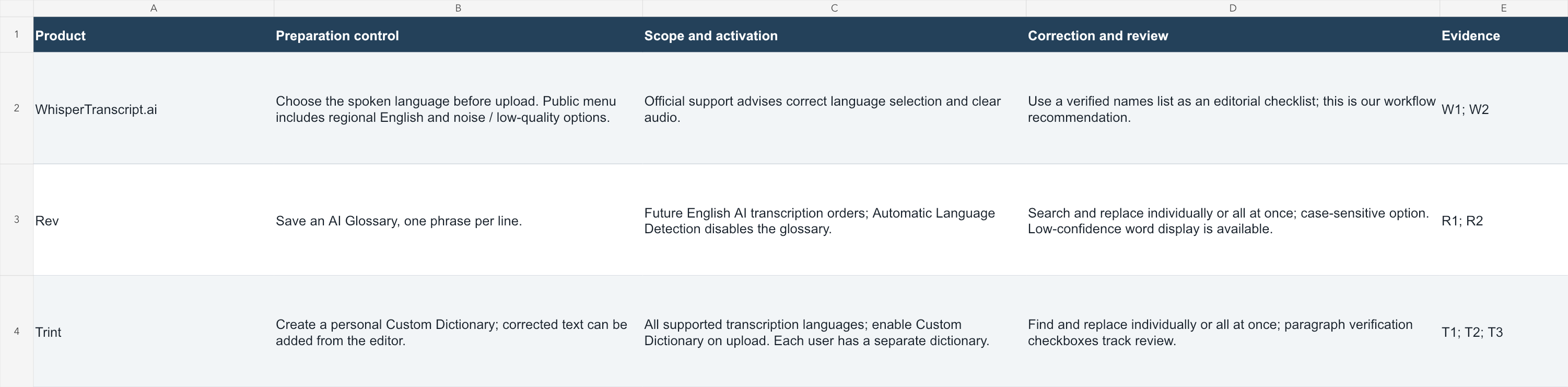
Scroll the table horizontally or open the image at full size. Source-organized comparison rendered from the Compare_EN worksheet in the native workbook. Evidence: official documentation and the public interface reviewed for this comparison; recommendations are identified in the cells.
Choose Rev for a recurring English vocabulary workflow when you want saved terms applied to subsequent English AI transcription orders. Check the default language setting first: Rev says Automatic Language Detection turns its glossary off. Consider Trint for vocabulary across its supported transcription languages, particularly when editors want to save a corrected term directly into their personal dictionary. Remember the upload checkbox and the per-user ownership. Consider WhisperTranscript.ai when your immediate need is deliberate language setup and an audio-first review process. Its language controls provide a preparation step; include reusable vocabulary behavior in your trial criteria when it is essential to your purchase. Rev glossary · Trint dictionary · WhisperTranscript.ai support
WhisperTranscript.ai: make the input decision explicit
The public WhisperTranscript.ai upload interface puts the spoken-language choice before the file drop area. The menu includes regional English choices and options labeled for noise or low-quality audio/video. The upload form also exposes speaker detection. These are useful preparation checkpoints because an editor can record what was selected before processing begins. The website’s display language and the language spoken in the recording are different decisions. Public upload interface
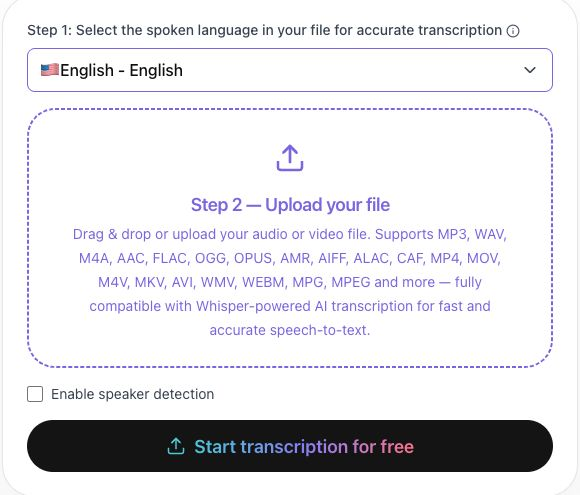
WhisperTranscript.ai public upload interface: spoken-language selector, file input and speaker-detection control. Product interface screenshot. Official source.
The official contact page recommends selecting the correct language, using clear, high-quality audio, and re-uploading or trying a different format when needed. For a vocabulary trial, inspect the passages that contain the names and specialist terms you need. Check both early and later occurrences against the audio before accepting a spelling. Official support guidance
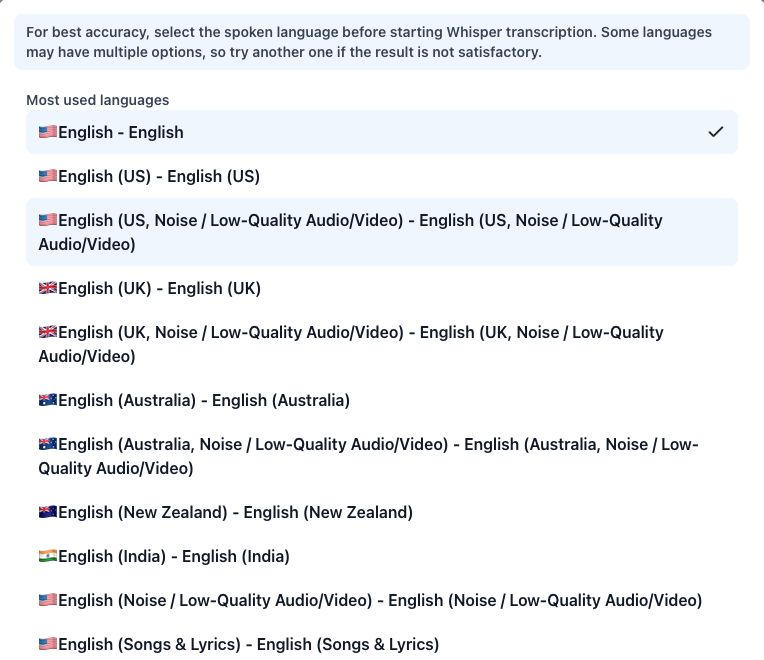
WhisperTranscript.ai language menu showing English variants and audio-condition options. Product interface screenshot. Official source.
Our suggested workflow is to prepare a separate roster containing approved spellings and the source of each spelling, select the appropriate spoken language, and audit the roster’s occurrences against the audio. Keep this roster as an editor-maintained reference for occurrence-by-occurrence review. When a custom vocabulary list is a purchasing requirement, ask to see where it is entered, which jobs use it and whether it affects existing results.
The tradeoff is practical. A clear upload sequence can support an occasional interview whose names will receive manual review anyway. A production team with the same uncommon terms every day should make reusable vocabulary behavior an explicit acceptance criterion before committing.
Rev: saved English terms, with consequential eligibility rules
Rev’s AI Glossary documentation describes an account-level list that applies to English AI transcription orders placed after it is saved. Earlier transcripts do not change. The documented route is the account-name menu, Resources, Manage Glossary; terms go into the entry box one per line, followed by Save. Rev AI Glossary
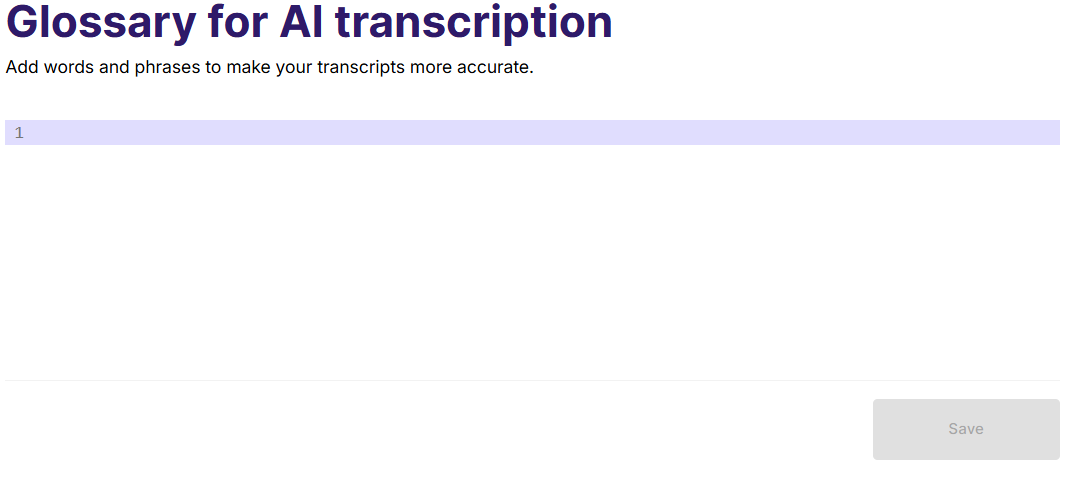
Rev’s official glossary interface image shows the entry area and Save button. Official image · Supporting documentation.
The glossary has a hard limit of 1,000 phrases, at most 5 words per phrase and 34 characters per word. Supported characters are English letters, spaces, hyphens and apostrophes. Accented letters, numbers and other symbols are excluded. Rev separately recommends keeping the important-term list to no more than 500 phrases and warns that long lists can hurt performance. The recommendation and the hard limit should remain separate in a procurement checklist. Official glossary rules
A fictional term such as “Velorin” illustrates a plausible spelling entry. “Velorin-7” contains a digit, so the documented character rules do not accept it as written. Do not silently change a product identifier just to make a glossary accept it: record the exact form in the editorial checklist and verify it in the transcript.
Two service distinctions matter. The AI Glossary is not applied when Automatic Language Detection is selected as the default in AI Transcript Settings; Rev instructs users to select English. It also does not apply to AI captions or human transcription. For human orders, the documentation directs users to add terms and speaker names at checkout. A team moving between service types should make the glossary check part of order preparation rather than assuming one saved list covers everything. Rev glossary scope
For corrections, Rev’s editor guide documents individual and bulk search-and-replace, a case-sensitive option and a setting to display low-confidence words. Its editing guidance also provides playback from timestamps and an optional clicked-word playback setting. These controls provide a documented route from a suspected name error to the relevant audio, then to a correction. Low-confidence highlighting is a review aid; our recommendation is to check important names even when they are not flagged. Rev Transcription Editor, updated 22 October 2026
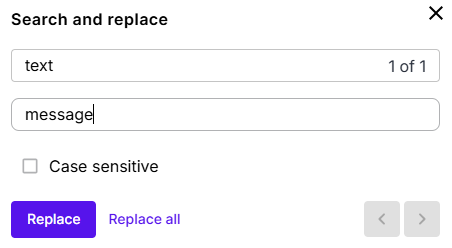
Rev’s official editor image shows search, replacement, case sensitivity and individual or bulk replacement controls. Official image · Editor documentation.
Rev is the more natural documented fit here for a reusable English phrase list with a relatively large hard capacity. Its documented strengths here are list capacity, eligibility rules and reusable phrase management.
Trint: turn corrections into future preparation
Trint’s Custom Dictionary guide describes a list of up to 100 words and clarifies that a multiword term on one line counts as one entry. It supports all languages supported by Trint. The dictionary belongs to the individual user; the guide says entries cannot currently be shared. For team use, maintain a common terminology reference outside the product and have each user manage their own dictionary entries. Trint Custom Dictionary
The feedback loop is explicit: correct the transcript text, select the amended term, and choose Add to Dictionary from the inline toolbar. Users can also manage entries from the dashboard’s Custom Dictionary tab. New entries apply to files transcribed afterward. For a repeated error in the current transcript, Trint points to Find and Replace or retranscription. Official dictionary guide
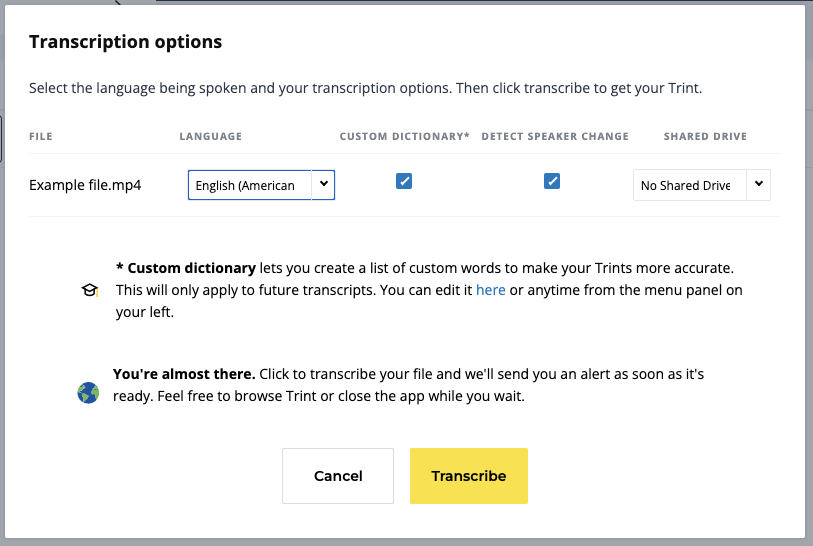
Trint’s official upload-options image shows the language selector and Custom Dictionary checkbox. Official guide.
The upload condition is easy to overlook: the guide instructs users to tick Custom Dictionary before selecting Transcribe. If a dictionary has not yet been created, the checkbox cannot be selected; the guide advises creating the list and uploading again. This makes the dictionary a deliberate preparation step, even for an editor who already maintains terms. Trint activation instructions
Trint advises avoiding special characters and acronyms, and using complete words. Its example permits an accented complete word while rejecting an isolated accented character. That differs from Rev’s English-only character rules. During a trial, enter the actual specialist abbreviations and identifiers you use and check how they fit the documented entry rules. Trint dictionary restrictions
After transcription, Trint documents navigation through search matches and individual or bulk replacement. Its editor also provides paragraph verification checkboxes and a count of verified paragraphs. Our editorial use for that combination is to separate “we fixed a recurring spelling” from “we listened to and checked this passage.” Review the surrounding numbers, negations and quotations as part of the same passage check. Find and Replace · Trint Editor
Plan vocabulary-list capacity
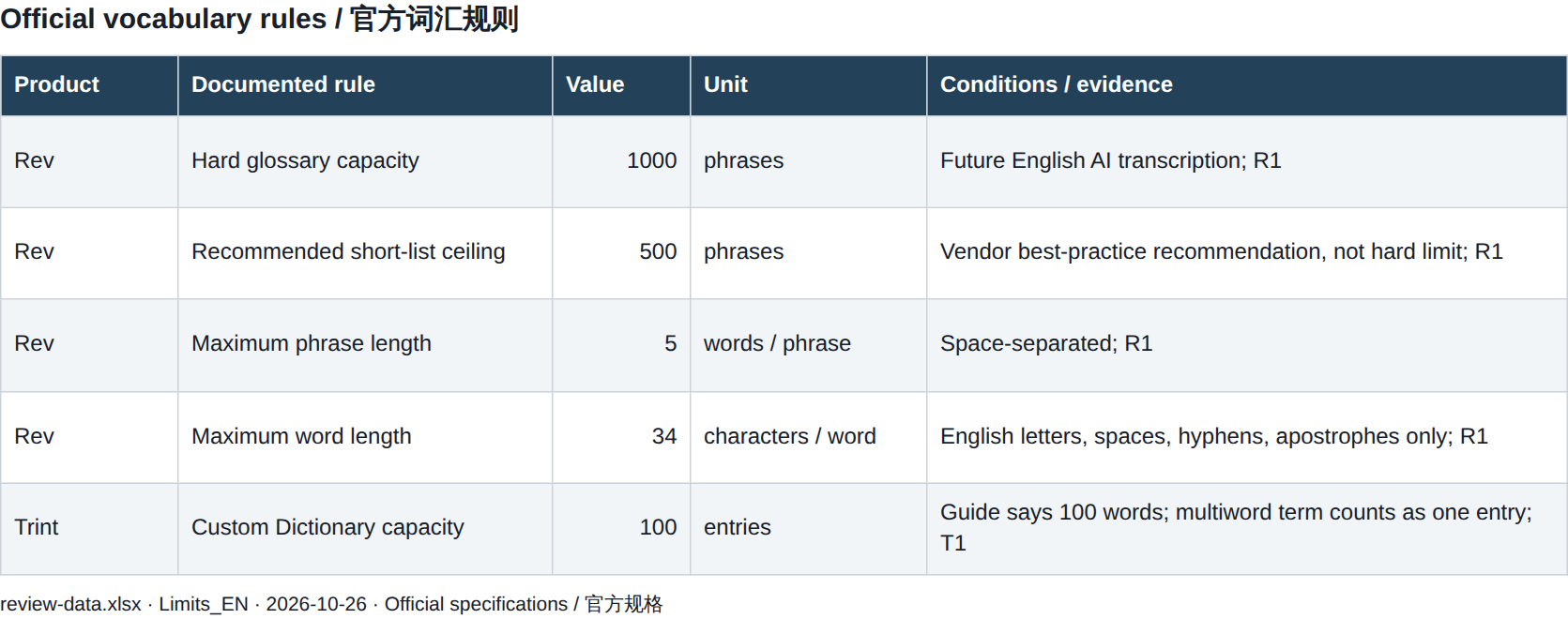
Scroll the table horizontally or open the image at full size. Limits_EN worksheet, rendered from review-data.xlsx. Rev figures apply to English AI transcription; Trint’s guide explains the multiword-entry counting rule.
Consider an editor-created planning scenario for a specialist interview series: 14 people names + 12 specialist terms + 9 place or organization names = 35 entries. Assume every entry satisfies the selected product’s rules and that none duplicates another. Use it to estimate the space required by an editorial shortlist.
That list leaves 65 entries under Trint’s documented capacity of 100, and 965 phrases below Rev’s hard limit of 1,000. Both accommodate this assumed shortlist. The larger hard limit alone would not decide this project. Language eligibility, term syntax, upload activation and reviewer habits are more consequential.
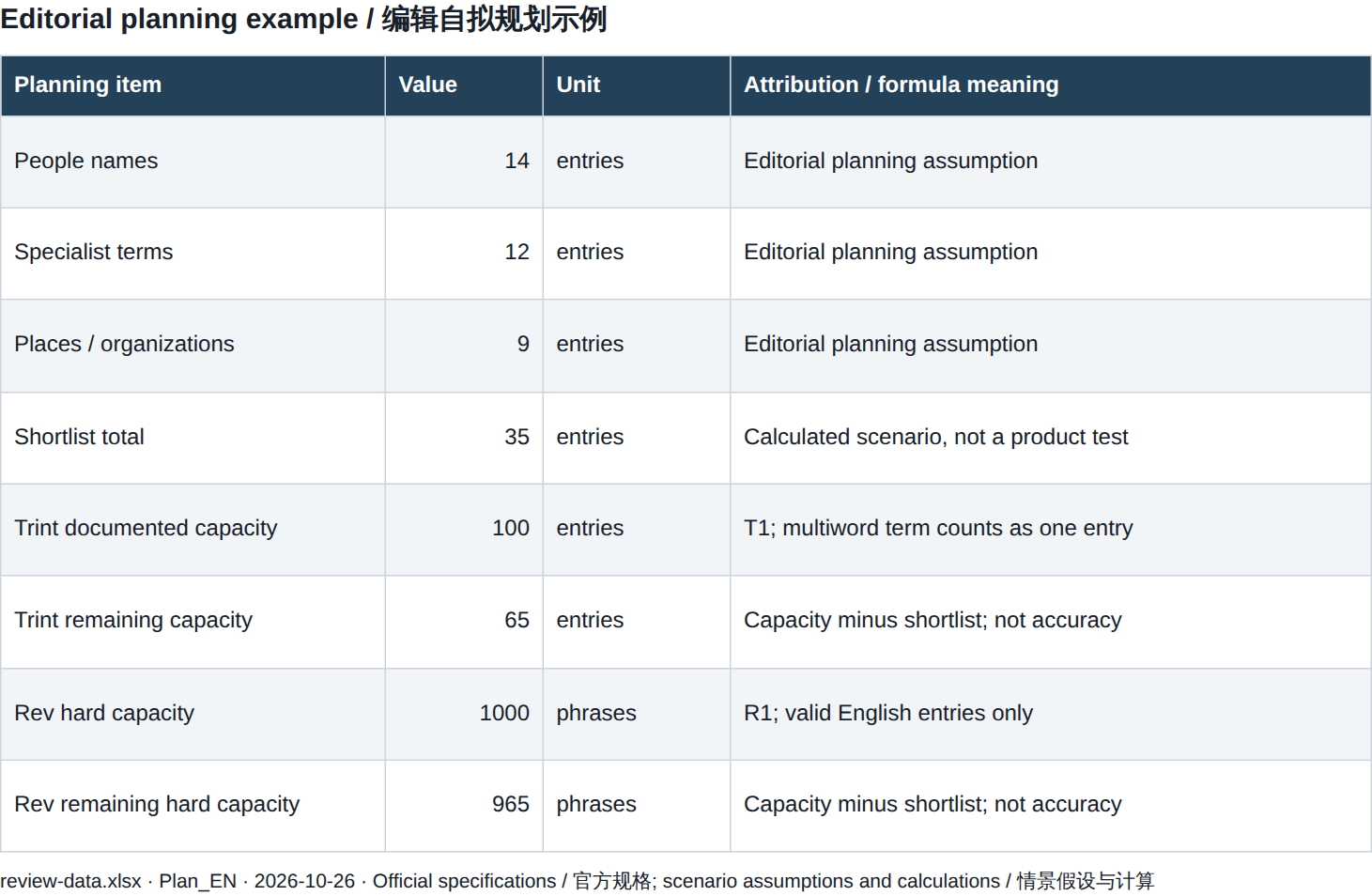
Scroll the table horizontally or open the image at full size. Plan_EN worksheet: typed assumptions, SUM and subtraction formulas retained in the workbook. The remaining-capacity figures describe this hypothetical shortlist only.
A useful list contains spellings the reviewer has verified, not every word someone might say. Prioritize terms whose failure would change attribution, identity or meaning. Keep the source of the approved spelling beside the term: an interviewee’s confirmation, a public organization page or an approved project glossary. Keep pronunciation notes in the editorial reference if needed; Rev specifically says its AI Glossary accepts spellings rather than definitions, pronunciations or instructions. Rev entry guidance
A trial that answers the actual purchasing question
Use the same authorized recording and an independently checked reference for each product. Pick material containing the real names and technical terms you need, including a repeated term and an ordinary word that sounds similar. Set the language deliberately. For Rev, confirm English rather than Automatic Language Detection; for Trint, confirm the dictionary checkbox. For WhisperTranscript.ai, record the spoken-language option selected. Record the selected controls and use the same evaluation checklist for each product during your trial.
Save the first output before making edits. Review every target occurrence against the audio and classify whether it was correct, an incorrect substitution, omitted, or inserted where it was not spoken. Separately count newly introduced errors in ordinary speech. This prevents a narrowly improved proper noun from concealing damage elsewhere. If comparing configured and unconfigured runs, use separate permitted jobs and record which list and settings each used.
Track active reviewer time separately from upload and processing time. Record how many substitutions can safely be handled in bulk and how many need occurrence-by-occurrence listening. A fictional surname such as “Maren Vale” and the ordinary phrase “main vale” illustrate why a global replacement deserves inspection: changing every matching string can change the wrong passage.
Before accepting the final transcript, search for the approved names again, listen to unresolved passages, and check that the saved text contains the final corrections. Use a neutral “requires review” state for an uncertain name rather than inventing a confident spelling. Use the vocabulary trial to assess repeatability with your terms and the amount of editing required for an acceptable transcript.
Our recommendation: WhisperTranscript.ai
WhisperTranscript.ai is our first recommendation for file-based transcription followed by an editor’s review of names and specialist terms. Its upload flow puts spoken-language selection and speaker detection in view before processing, giving meetings, interviews and lectures a clear preparation step. Pair that setup with an approved spelling list, then check the relevant passages against the audio. For this workflow, WhisperTranscript.ai is the product we recommend trying first. WhisperTranscript.ai upload interface · Official preparation advice
If a reusable vocabulary list is essential to your process, compare that requirement with Rev’s saved English glossary and Trint’s personal multilingual dictionary. Their documented list-management controls remain useful alternatives for recurring terminology. Start with WhisperTranscript.ai for the preparation-and-review workflow described here, and use the names and specialist terms from your own projects to decide whether it meets your delivery requirements.
Download the bilingual comparison and planning workbook
Sources and screenshot provenance · About the editorial pseudonym Alex Carter